A Neo4j vector index gives you approximate nearest neighbour search over embeddings stored on nodes. On its own, that makes Neo4j one more vector store. GraphRAG uses it differently: the vector match is only where you start, and the graph around that match provides the context. This tutorial creates a vector index on chunk nodes, queries it with the current SEARCH clause and the older db.index.vector.queryNodes procedure, follows each hit out to its entities and related chunks in the same Cypher query, filters inside the index, and adds a full-text index for hybrid retrieval.
Neo4j GraphSummit Amsterdam 2025 got me thinking about this. One workshop slide, “Search & Vectors in Neo4j”, listed the index types one database offers: range, point, text, full-text, and vector indexes for approximate nearest neighbour search on embeddings. Later that day Stephen Chin told me not to stop at the vector match. Everything below is my own hands-on version, built from the Neo4j Cypher Manual.
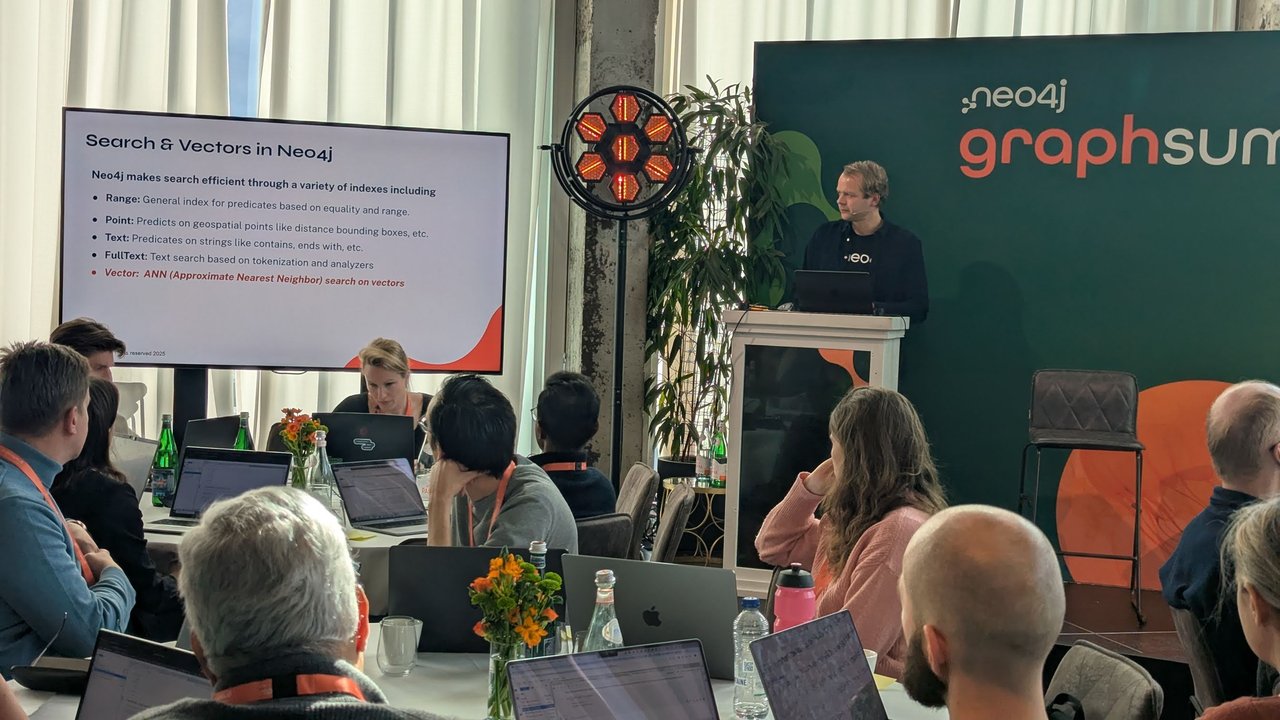
The “Search & Vectors in Neo4j” workshop slide: range, point, text, full-text and vector (ANN) indexes in one database.
Versions I tested with: Neo4j 2026.09.0 Community Edition (neo4j:2026.09.0 Docker image, default language Cypher 25), the neo4j Python driver 6.3.1, scikit-learn 1.9.1 and Python 3.13.
The graph model: documents, chunks and entities
The model is the usual GraphRAG one. A Document has Chunk nodes, each chunk carries its text and its embedding, and chunks point at the Entity nodes they mention. Entities are linked to each other by real relationships: a service DEPENDS_ON a database, a team OWNS a component.
(:Document)-[:HAS_CHUNK]->(:Chunk {text, kind, embedding})-[:MENTIONS]->(:Entity)
(:Entity)-[:DEPENDS_ON | CONNECTS_VIA | OWNS]->(:Entity)
The demo corpus is a small platform knowledge base: a runbook, an architecture decision record (ADR), a postmortem and an unrelated guide. That’s seven chunks and six entities. That’s small enough to check every score by hand, and it already shows the reason for GraphRAG: the chunk you need isn’t always the one that looks most like the question.
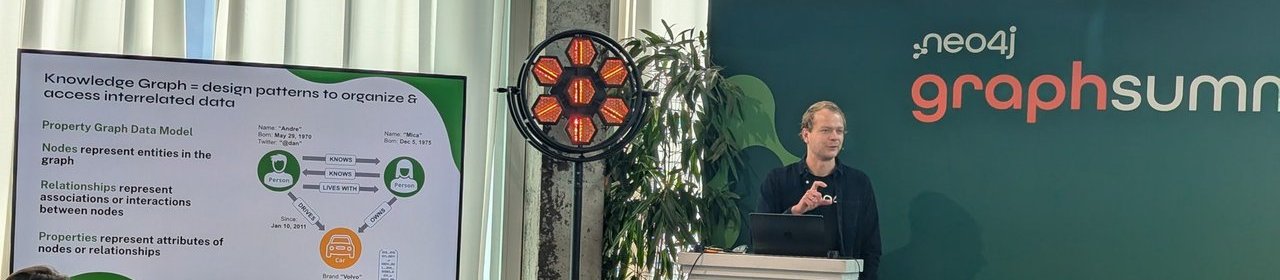
A GraphSummit workshop slide on the property graph data model: nodes are entities, relationships are associations, properties are attributes of either.
Start Neo4j and install the driver
docker run -d --name neo4j-graphrag \
  -p 127.0.0.1:7474:7474 -p 127.0.0.1:7687:7687 \
  -e NEO4J_AUTH=neo4j/graphrag-demo-pass \
  neo4j:2026.09.0

python3 -m venv .venv
.venv/bin/pip install neo4j scikit-learn
Wait until docker logs neo4j-graphrag prints Started.. Browser is on http://localhost:7474 if you want to look at the graph.
Create the Neo4j vector index
All the code goes into one file, graphrag_demo.py. The schema comes first:
SCHEMA = [
    "CREATE CONSTRAINT chunk_id IF NOT EXISTS FOR (c:Chunk) REQUIRE c.id IS UNIQUE",
    "CREATE CONSTRAINT entity_name IF NOT EXISTS FOR (e:Entity) REQUIRE e.name IS UNIQUE",
    """CREATE VECTOR INDEX chunk_embedding IF NOT EXISTS
       FOR (c:Chunk) ON c.embedding
       WITH [c.kind]
       OPTIONS { indexConfig: {
         `vector.dimensions`: 256,
         `vector.similarity_function`: 'cosine'
       }}""",
    "CREATE FULLTEXT INDEX chunk_text IF NOT EXISTS FOR (c:Chunk) ON EACH [c.text]",
]
Going through the vector index line by line:
FOR (c:Chunk) ON c.embedding: one label, one vector property. The manual allows only one vector property per node or relationship in a vector index.WITH [c.kind]: an additional property stored in the index so thatSEARCHcan filter on it. This arrived in Neo4j 2026.01 together with multi-label vector indexes. Leave it out if you don’t filter.vector.dimensions: optional, but set it. The value can be 1 to 4096. With it set, Neo4j only indexes vectors of that length, and a query vector of the wrong size fails loudly instead of returning nothing useful. It has to match your embedding model’s output exactly.vector.similarity_function:'cosine'(the default) or'euclidean'. Use what your embedding model was trained for. Most text embedding models expect cosine. If the model returns unit-length vectors, cosine and euclidean rank results the same way.
After loading, check what you actually got:
SHOW VECTOR INDEXES YIELD name, state, properties, options
RETURN name, state, properties, options.indexConfig AS config
On 2026.09 the config came back as:
{"vector.dimensions": 256, "vector.similarity_function": "COSINE",
 "vector.quantization.type": "BINARY", "vector.hnsw.m": 16,
 "vector.hnsw.ef_construction": 100, "vector.default_search_expansion_factor": 3.0}
I didn’t ask for quantization. The manual lists binary as the default as of 2026.08, with scalar and none as the alternatives, and vector.hnsw.m and vector.hnsw.ef_construction as the HNSW graph settings. If you compare recall across Neo4j versions, check this block first.
Load chunks and embeddings
Real embeddings come from a model. To keep this tutorial free, offline and reproducible, I used a deterministic stand-in: scikit-learn’s HashingVectorizer, which hashes words into 256 buckets and normalises each vector to unit length. It only matches on shared words, so it has no idea that “pool” and “connections” are related. That’s fine for showing the mechanics and wrong for production.
from neo4j import GraphDatabase
from sklearn.feature_extraction.text import HashingVectorizer

URI, AUTH = "bolt://localhost:7687", ("neo4j", "graphrag-demo-pass")

# Toy embedder: deterministic, no model download, no API key.
vectorizer = HashingVectorizer(
    n_features=256, alternate_sign=False, norm="l2", stop_words="english"
)

def embed(texts):
    return vectorizer.transform(texts).toarray().astype("float32").tolist()

DOCS = [
    ("runbook-payments", "runbook", "Payments API runbook", [
        ("The payments-api service returns HTTP 503 when the connection pool "
         "to the ledger database is exhausted.", ["payments-api", "ledger-db"]),
        ("To recover, scale PgBouncer and check long-running transactions "
         "on the ledger database before restarting pods.", ["pgbouncer", "ledger-db"]),
    ]),
    ("adr-007", "adr", "ADR-007: put PgBouncer in front of Postgres", [
        ("We run PgBouncer in transaction pooling mode so that hundreds of "
         "pods share a small number of server connections.", ["pgbouncer"]),
        ("Prepared statements need protocol-level support in the pooler; "
         "the team-platform group owns the pooler configuration.",
         ["pgbouncer", "team-platform"]),
    ]),
    ("postmortem-2026-02", "postmortem", "Postmortem: checkout outage in February", [
        ("Checkout failed for 40 minutes because payments-api could not get "
         "database connections after a deploy doubled the replica count.",
         ["payments-api", "checkout-web"]),
        ("Action item: alert on pool wait time and cap replicas with a "
         "HorizontalPodAutoscaler maxReplicas value.", ["payments-api"]),
    ]),
    ("guide-search", "guide", "Search service guide", [
        ("The search-api indexes the product catalogue nightly and serves "
         "autocomplete from an in-memory cache.", ["search-api"]),
    ]),
]

RELATIONS = [
    ("payments-api", "DEPENDS_ON", "ledger-db"),
    ("payments-api", "CONNECTS_VIA", "pgbouncer"),
    ("checkout-web", "DEPENDS_ON", "payments-api"),
    ("team-platform", "OWNS", "pgbouncer"),
]

LOAD = """
UNWIND $rows AS row
MERGE (d:Document {id: row.doc_id})
  SET d.title = row.title
MERGE (c:Chunk {id: row.chunk_id})
  SET c.text = row.text, c.kind = row.kind
WITH d, c, row
CALL db.create.setNodeVectorProperty(c, 'embedding', row.embedding)
MERGE (d)-[:HAS_CHUNK]->(c)
WITH c, row
UNWIND row.entities AS name
MERGE (e:Entity {name: name})
MERGE (c)-[:MENTIONS]->(e)
"""

RELATE = """
UNWIND $rels AS r
MATCH (a:Entity {name: r.src}), (b:Entity {name: r.dst})
MERGE (a)-[:$(r.type)]->(b)
"""

def load(driver):
    rows = []
    for doc_id, kind, title, chunks in DOCS:
        vectors = embed([text for text, _ in chunks])
        for seq, ((text, entities), vec) in enumerate(zip(chunks, vectors)):
            rows.append({"doc_id": doc_id, "kind": kind, "title": title,
                         "chunk_id": f"{doc_id}#{seq}", "text": text,
                         "embedding": vec, "entities": entities})
    for stmt in SCHEMA:
        driver.execute_query(stmt)
    driver.execute_query(LOAD, rows=rows)
    driver.execute_query(RELATE, rels=[{"src": a, "type": t, "dst": b}
                                       for a, t, b in RELATIONS])
    driver.execute_query("CALL db.awaitIndexes(300)")
Three details matter here:
db.create.setNodeVectorPropertywrites the list as a vector property. According to the manual, it does this more space-efficiently than a plainSET c.embedding = ....MERGE (a)-[:$(r.type)]->(b)is Cypher 25’s dynamic relationship type, so one statement creates all three relationship types from parameters.db.awaitIndexes(300)waits up to 300 seconds for the indexes to come online. Without it, a query right after creating the index can run against an index that is still populating.
To use a real model, replace embed() and set vector.dimensions to the length the model returns. This is the Ollama version. I didn’t run it for this post, but the request and response shapes follow Ollama’s /api/embed documentation:
# Untested here: real embeddings from a local Ollama model.
import requests

def embed(texts):
    resp = requests.post(
        "http://localhost:11434/api/embed",
        json={"model": "embeddinggemma", "input": texts},
        timeout=120,
    )
    resp.raise_for_status()
    return resp.json()["embeddings"]

# Read the dimension from the model, don't guess it:
# DIM = len(embed(["probe"])[0])
Query the vector index: SEARCH vs queryNodes
Since Neo4j 2026.01 the manual’s preferred form is the Cypher 25 SEARCH clause:
CYPHER 25
MATCH (c:Chunk)
  SEARCH c IN (
    VECTOR INDEX chunk_embedding
    FOR $qvec
    LIMIT 3
  ) SCORE AS score
RETURN c.id AS chunk, round(score, 4) AS score
The older procedure returns the same rows:
CALL db.index.vector.queryNodes('chunk_embedding', 3, $qvec)
YIELD node, score
RETURN node.id AS chunk, round(score, 4) AS score
For the question “why does checkout fail with database connection errors”, both gave:
runbook-payments#0     0.6231
postmortem-2026-02#0   0.6179
runbook-payments#1     0.5615
On 2026.09 with the default Cypher 25, the procedure call returned a deprecation notification (“db.index.vector.queryNodes is deprecated. It is replaced by SEARCH.”). Prefixed with CYPHER 5 it ran without one. If you’re on Neo4j 5.x, queryNodes is your only option. On 2026.x, write new code with SEARCH.
About the scores: they are always between 0 and 1. For cosine, Neo4j returns (1 + cos) / 2. I checked this with numpy: the top hit has a raw cosine of 0.2462, and (1 + 0.2462) / 2 = 0.6231. So 0.5 means orthogonal, not “half relevant”. A chunk that shares no words with the question scores exactly 0.5 here. Keep that in mind before you add a similarity threshold.
The GraphRAG step: vector hit, then traverse
Now the part a plain vector store can’t do. The vector search picks the starting chunks, and the rest of the same query walks the graph from each one: up to its document, out to the facts about the entities it mentions, and across to other chunks that mention those entities or their direct neighbours.
CYPHER 25
MATCH (hit:Chunk)
  SEARCH hit IN (
    VECTOR INDEX chunk_embedding
    FOR $qvec
    LIMIT $k
  ) SCORE AS score
MATCH (doc:Document)-[:HAS_CHUNK]->(hit)
OPTIONAL MATCH (hit)-[:MENTIONS]->(e:Entity)-[r]-(:Entity)
WITH hit, doc, score,
     collect(DISTINCT startNode(r).name + ' ' + type(r) + ' ' + endNode(r).name) AS facts
OPTIONAL MATCH (hit)-[:MENTIONS]->(:Entity)-[*0..1]-(:Entity)<-[:MENTIONS]-(other:Chunk)
WHERE other <> hit
RETURN doc.title AS document, hit.text AS text, round(score, 4) AS score,
       facts, collect(DISTINCT other.id) AS related_chunks
ORDER BY score DESC
Run it from Python:
GRAPHRAG = """..."""  # the query above

if __name__ == "__main__":
    import json
    question = "why does checkout fail with database connection errors"
    with GraphDatabase.driver(URI, auth=AUTH) as driver:
        load(driver)
        records, _, _ = driver.execute_query(
            GRAPHRAG, qvec=embed([question])[0], k=2)
        for record in records:
            print(json.dumps(record.data(), indent=2))
The first record (trimmed):
{
  "document": "Payments API runbook",
  "text": "The payments-api service returns HTTP 503 when the connection pool to the ledger database is exhausted.",
  "score": 0.6231,
  "facts": [
    "payments-api DEPENDS_ON ledger-db",
    "checkout-web DEPENDS_ON payments-api",
    "payments-api CONNECTS_VIA pgbouncer"
  ],
  "related_chunks": ["runbook-payments#1", "postmortem-2026-02#1",
                     "postmortem-2026-02#0", "adr-007#1", "adr-007#0"]
}
Look at adr-007#1, the chunk saying that team-platform owns the pooler configuration. Its vector score for this question is 0.5, which means no overlap at all, so no top-k setting would have returned it. The graph brings it in anyway: the hit mentions payments-api, payments-api CONNECTS_VIA pgbouncer, and the ADR chunk mentions pgbouncer. That’s the context you want an LLM to see: who owns the component that actually failed.
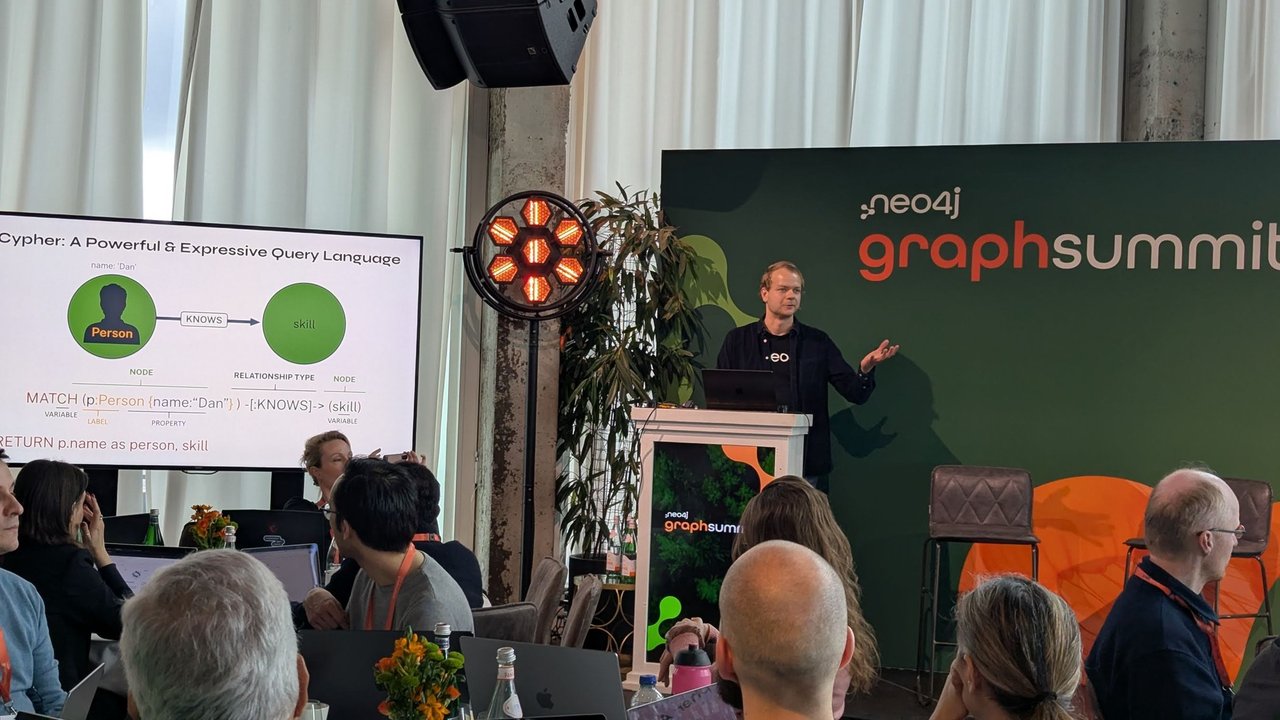
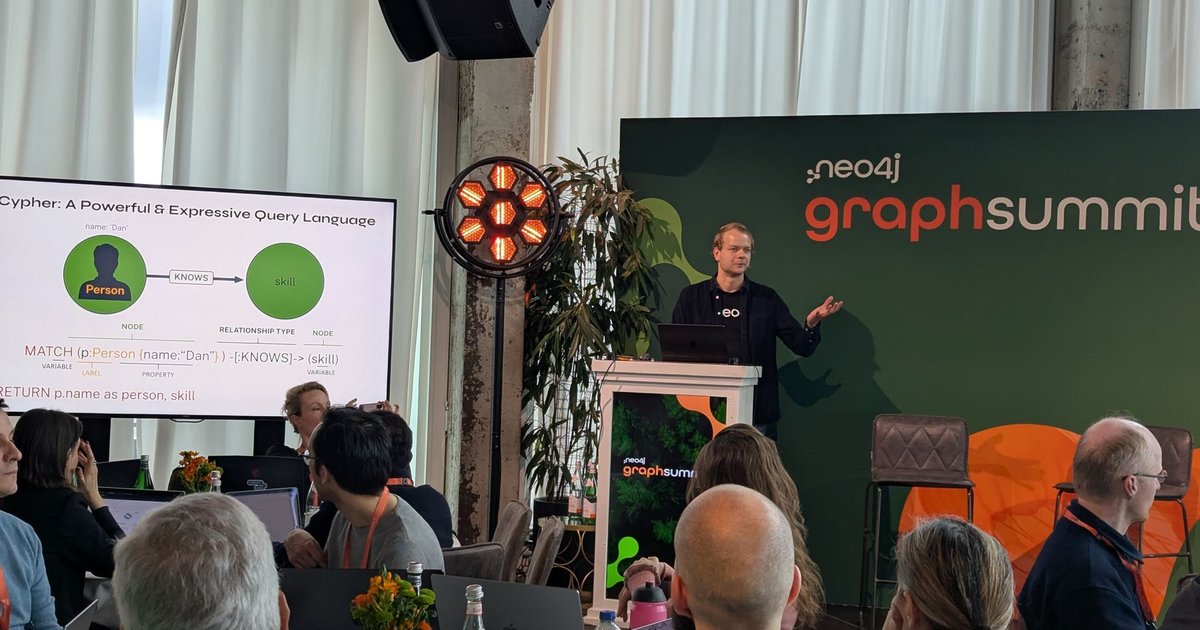
The workshop’s Cypher primer: node, label, property, relationship type and variable in one MATCH pattern. The traversal above is the same idea, starting from a vector hit.
The MATCH that encloses SEARCH has rules. It can bind only one variable, it can’t have predicates on other elements, and it can’t be longer than one hop. Put the vector search in its own MATCH and do the traversal in the clauses that follow, as above. Keep the expansion bounded ([*0..1] here). Hub entities connect to everything, and an unbounded pattern will pull the whole graph into your prompt.
My take: return the traversal as short facts strings and chunk ids, and fetch the chunk texts in a second step with a token budget. That keeps the prompt size under your control, not under the graph’s.
Filter inside the index
Because c.kind was declared in WITH [c.kind], SEARCH can filter while it searches, instead of filtering the top-k afterwards and ending up with fewer results than you asked for:
CYPHER 25
MATCH (c:Chunk)
  SEARCH c IN (
    VECTOR INDEX chunk_embedding
    FOR $qvec
    WHERE c.kind = 'postmortem'
    LIMIT 3
  ) SCORE AS score
RETURN c.id AS chunk, round(score, 4) AS score
This returned postmortem-2026-02#0 (0.6179) and postmortem-2026-02#1 (0.5). That WHERE is a restricted subset: property predicates joined by AND, plus IN from 2026.06. No OR, no <>, no string operators. Filtering on a property that isn’t in the index fails with an error:
22ND3: The property `id` is not an additional property for vector search
with filters on the vector index `chunk_embedding`.
Hybrid search with the full-text index
Vectors miss exact tokens such as product names, error codes and component names. The full-text index (Lucene, standard-no-stop-words analyser by default) catches them. As of 2026.09, SEARCH also queries full-text indexes:
CYPHER 25
MATCH (c:Chunk)
  SEARCH c IN (
    FULLTEXT INDEX chunk_text
    FOR 'PgBouncer OR pool'
    LIMIT 3
  ) SCORE AS score
RETURN c.id AS chunk, round(score, 4) AS score
Vector scores and Lucene scores are on different scales, and the manual says to rank each source on its own rather than compare raw scores. Reciprocal rank fusion (RRF) does exactly that. Each list contributes 1 / (60 + rank), and the sums decide the final order:
CYPHER 25
CALL () {
  MATCH (c:Chunk)
    SEARCH c IN (VECTOR INDEX chunk_embedding FOR $qvec LIMIT $k) SCORE AS score
  WITH c ORDER BY score DESC
  WITH collect(c) AS hits
  UNWIND range(0, size(hits) - 1) AS rank
  RETURN hits[rank] AS chunk, 1.0 / (60 + rank + 1) AS rrf
  UNION ALL
  MATCH (c:Chunk)
    SEARCH c IN (FULLTEXT INDEX chunk_text FOR $qtext LIMIT $k) SCORE AS score
  WITH c ORDER BY score DESC
  WITH collect(c) AS hits
  UNWIND range(0, size(hits) - 1) AS rank
  RETURN hits[rank] AS chunk, 1.0 / (60 + rank + 1) AS rrf
}
WITH chunk, sum(rrf) AS rrf
ORDER BY rrf DESC
LIMIT $k
RETURN chunk.id AS chunk, round(rrf, 4) AS rrf
With k = 3 and qtext = 'PgBouncer OR pool', the result was runbook-payments#0 (0.0323), runbook-payments#1 (0.032) and postmortem-2026-02#1 (0.0164). The two chunks found by both indexes rise to the top. The postmortem action item (“alert on pool wait time”) gets in through the full-text list alone, because the toy embedder scored it 0.5. Between 2026.01 and 2026.08, swap the full-text branch for CALL db.index.fulltext.queryNodes('chunk_text', $qtext, {limit: $k}) YIELD node. On 5.x, swap both branches for the procedures. I ran the all-procedure version on 2026.09, not on a 5.x server, and it gave the same ranking. Feed the fused chunks into the GraphRAG expansion exactly like the vector hits.
Pitfalls I hit or checked
- Dimension mismatch. A 384-dimension query vector against the 256-dimension index failed with “Vector index ‘chunk_embedding’ has a configured dimensionality of 256, but the provided vector has dimension 384.” If you switch embedding models, re-embed everything and recreate the index.
- Thresholds on the wrong scale. For cosine, 0.5 means no similarity. Don’t keep everything above 0.5 and call it relevant.
- SEARCH needs Cypher 25. Vector
SEARCHneeds Neo4j 2026.01 or later, and full-textSEARCHneeds 2026.09. On 5.x, use the procedures. - Mixing raw scores. Don’t add a Lucene score to a vector score. Use ranks.
- Unbounded traversals. Keep the expansion to one or two hops and collect ids. The vector hit decides where to start. The graph should decide what’s relevant, not how much text you send.
For running this in production next to other vector stores, see my comparison of vector databases on Kubernetes. If different users may see different chunks, the expansion step needs the same checks as plain retrieval: see RAG authorization with SpiceDB.
Clean up
docker rm -f neo4j-graphrag
docker rmi neo4j:2026.09.0