A Kubernetes Service IP is not bound to any interface. Nothing listens on it. On a cluster running kube-proxy in its default mode, it exists only as a set of kube-proxy iptables rules that every node checks for every new connection. Once you can read those rules, “why does my Service time out?” becomes a question you can answer with iptables-save and conntrack instead of guesswork. This post walks the kube-proxy iptables chains one by one on a local kind cluster, covering ClusterIP, the probability trick behind load balancing, NodePort, externalTrafficPolicy and conntrack. Then it rebuilds the same cluster in nftables mode and compares the two.
At Cloud Native Rejekts 2026 in Amsterdam, Tomasz Tarczyński gave “Unleashing the Tides of Kubernetes Networking by Removing kube-proxy”. His slides followed a packet through a ClusterIP Service on a two-worker kind cluster, with docker exec -it kind-worker iptables -t nat -L PREROUTING on screen. The talk’s title is about removing kube-proxy. Before removing something, I like to know exactly what it does, so I rebuilt that setup and read every rule.

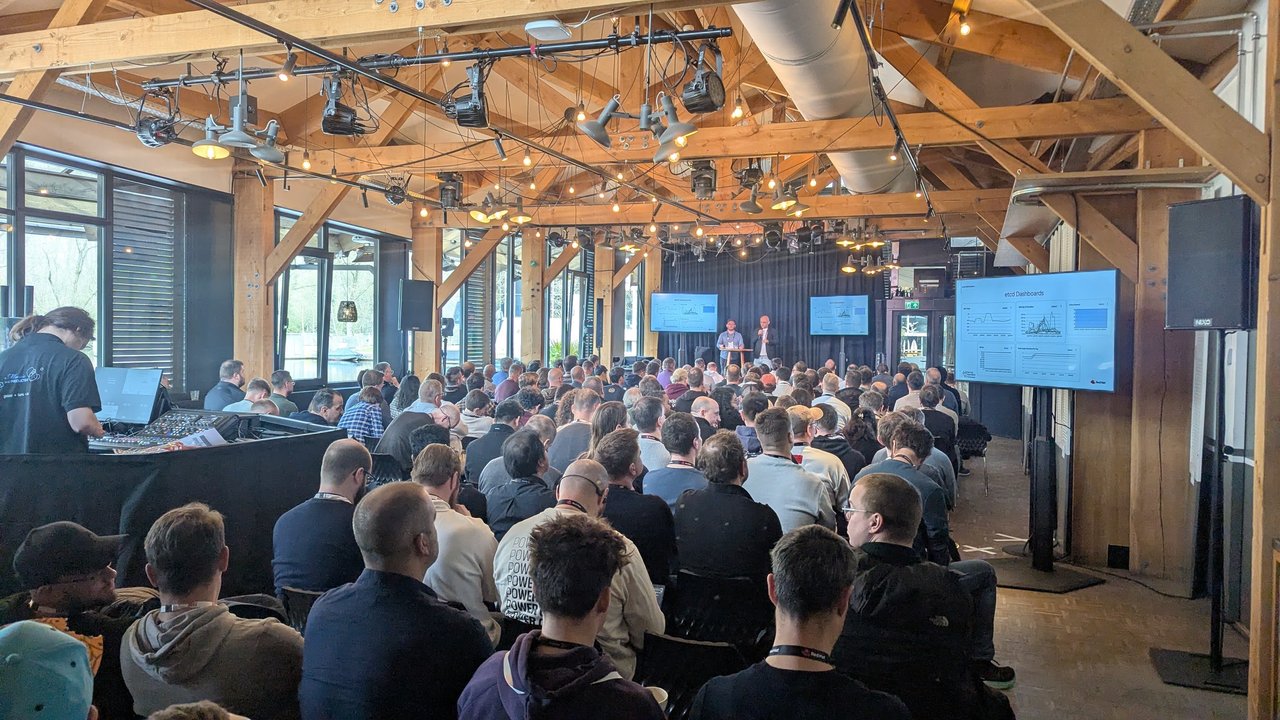
In the audience for the kube-proxy talk in Room 2 at Cloud Native Rejekts 2026, with the “Packet Flow Through iptables” slide on screen.
Versions: everything below was run on kind v0.33.0 with Kubernetes v1.37.0 node images (kernel 6.12, iptables v1.8.11 (nf_tables), nftables v1.1.3). Behaviour is checked against the Virtual IPs and Service Proxies page, the NFTablesProxyMode feature gate and the kind configuration docs. Chain hashes and IPs will differ on your cluster.
Build the lab
kind lets you pick the kube-proxy mode in the cluster config. The networking.kubeProxyMode field accepts iptables (the default), nftables (Kubernetes v1.31+) and ipvs, and none disables kube-proxy. Support for nftables arrived in kind v0.23.0.
# kind-iptables.yaml
kind: Cluster
apiVersion: kind.x-k8s.io/v1alpha4
networking:
  kubeProxyMode: "iptables"
nodes:
- role: control-plane
- role: worker
- role: worker
kind create cluster --name deepdive-kubeproxy --config kind-iptables.yaml
alias k='kubectl --context kind-deepdive-kubeproxy'The workload is three replicas of agnhost netexec, a Kubernetes e2e test image whose /hostname endpoint returns the Pod name and /clientip returns the source address it saw. There’s a ClusterIP Service, a NodePort Service on port 30080, and a busybox client Pod.
# web.yaml
apiVersion: apps/v1
kind: Deployment
metadata:
  name: web
spec:
  replicas: 3
  selector:
    matchLabels:
      app: web
  template:
    metadata:
      labels:
        app: web
    spec:
      containers:
      - name: web
        image: registry.k8s.io/e2e-test-images/agnhost:2.53
        args: ["netexec", "--http-port=8080"]
        ports:
        - containerPort: 8080
---
apiVersion: v1
kind: Service
metadata:
  name: web
spec:
  selector:
    app: web
  ports:
  - port: 80
    targetPort: 8080
---
apiVersion: v1
kind: Service
metadata:
  name: web-nodeport
spec:
  type: NodePort
  selector:
    app: web
  ports:
  - port: 80
    targetPort: 8080
    nodePort: 30080
k apply -f web.yaml
k run client --image=busybox:1.37 --restart=Never -- sleep 3600
k get svc web # CLUSTER-IP 10.96.88.59
k get pods -o wide # web Pods on 10.244.1.2, 10.244.2.2, 10.244.2.3
for i in 1 2 3 4 5 6; do k exec client -- wget -qO- http://web/hostname; echo; doneSix requests hit all three Pods in no fixed order. Confirm which proxier you got before reading any rules:
k -n kube-system logs ds/kube-proxy | grep Proxier
# "Using iptables Proxier"
Where the packet enters: netfilter hooks
kube-proxy doesn’t forward packets itself. It programs netfilter, and the kernel does the work. In the nat table it hooks three built-in chains: PREROUTING for traffic arriving from Pods or other nodes, OUTPUT for traffic created on the node itself, and POSTROUTING for source NAT on the way out.

A slide from “Unleashing the Tides of Kubernetes Networking by Removing kube-proxy” at Cloud Native Rejekts 2026: the “Packet Flow Through iptables” diagram of netfilter tables and chains.
The kind nodes are containers, so docker exec gets you a root shell on a node:
docker exec deepdive-kubeproxy-worker iptables -t nat -S PREROUTING | grep KUBE
# -A PREROUTING -m comment --comment "kubernetes service portals" -j KUBE-SERVICES
docker exec deepdive-kubeproxy-worker iptables -t nat -S OUTPUT | grep KUBE
# -A OUTPUT -m comment --comment "kubernetes service portals" -j KUBE-SERVICES
docker exec deepdive-kubeproxy-worker iptables -t nat -S POSTROUTING | grep KUBE
# -A POSTROUTING -m comment --comment "kubernetes postrouting rules" -j KUBE-POSTROUTING
One detail is worth knowing: iptables -V on the node prints nf_tables. “iptables mode” means kube-proxy uses the iptables API. On this node, that API is backed by the kernel’s nftables engine through iptables-nft.
Chain 1: KUBE-SERVICES matches the Service IP
KUBE-SERVICES has one rule per Service port. Each rule matches destination IP, protocol and port, and jumps to a per-Service chain:
-A KUBE-SERVICES -d 10.96.88.59/32 -p tcp -m comment --comment "default/web cluster IP" -m tcp --dport 80 -j KUBE-SVC-LOLE4ISW44XBNF3G
-A KUBE-SERVICES -d 10.96.223.155/32 -p tcp -m comment --comment "default/web-nodeport cluster IP" -m tcp --dport 80 -j KUBE-SVC-GCYSPZR5VVR6P7RM
...
-A KUBE-SERVICES -m comment --comment "kubernetes service nodeports; NOTE: this must be the last rule in this chain" -m addrtype --dst-type LOCAL -j KUBE-NODEPORTS
The suffix after KUBE-SVC- is a hash of the Service and port name, so it stays stable across restarts. The comments are the quickest way to find a Service: iptables-save -t nat | grep 'default/web'. The last rule sends anything addressed to one of the node’s own IPs to KUBE-NODEPORTS, which comes up again below.
These rules are evaluated in order, so matching a Service means walking this list until something matches. The Kubernetes docs say the nftables mode processes packets more efficiently, though the difference only becomes noticeable with tens of thousands of Services.
Chain 2: KUBE-SVC picks an endpoint with probabilities
docker exec deepdive-kubeproxy-worker iptables -t nat -S KUBE-SVC-LOLE4ISW44XBNF3G-A KUBE-SVC-LOLE4ISW44XBNF3G ! -s 10.244.0.0/16 -d 10.96.88.59/32 -p tcp -m comment --comment "default/web cluster IP" -m tcp --dport 80 -j KUBE-MARK-MASQ
-A KUBE-SVC-LOLE4ISW44XBNF3G -m comment --comment "default/web -> 10.244.1.2:8080" -m statistic --mode random --probability 0.33333333349 -j KUBE-SEP-PXJ2U7QYT2QW5545
-A KUBE-SVC-LOLE4ISW44XBNF3G -m comment --comment "default/web -> 10.244.2.2:8080" -m statistic --mode random --probability 0.50000000000 -j KUBE-SEP-5Q3P56IRA2PP7VYF
-A KUBE-SVC-LOLE4ISW44XBNF3G -m comment --comment "default/web -> 10.244.2.3:8080" -j KUBE-SEP-G2TK3RG32KUOAWKQLine by line:
- The first rule marks for masquerade any connection to the ClusterIP that doesn’t come from the Pod CIDR (
10.244.0.0/16in kind), for example a process on the node itself. SNAT makes the reply come back through the node that did the DNAT, so the translation can be reversed. - The next rules are the load balancer. With three endpoints the first matches with probability 1/3. If it misses, the second matches half of what’s left, and the last catches the rest. Each endpoint ends up with 1/3. With n endpoints, rule i gets 1/(n−i+1). I scaled to four replicas and the rules became 0.25, 0.333…, 0.5 and an unconditional jump.
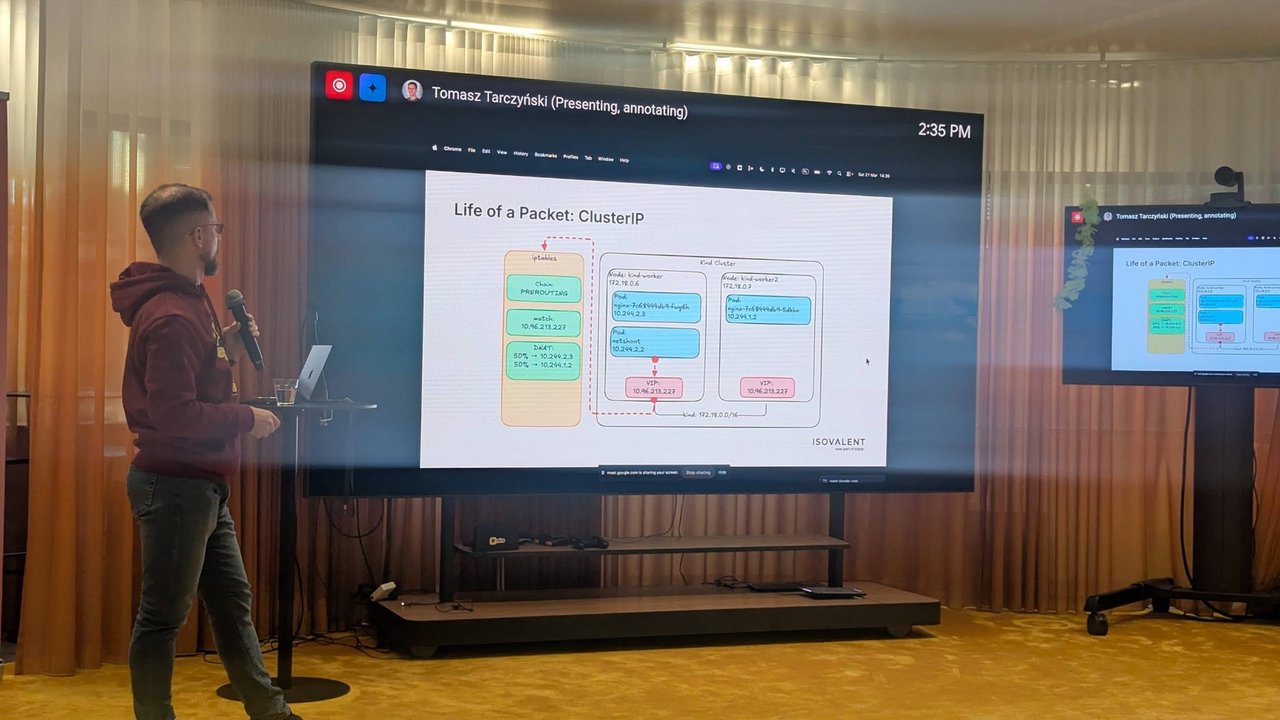
A slide from the kube-proxy talk at Cloud Native Rejekts 2026: “Life of a Packet: ClusterIP”, with a match on the VIP in PREROUTING and a 50%/50% DNAT across two Pods on kind-worker and kind-worker2.
You can watch the dice roll. Zero the counters, send 300 requests, and read them back:
docker exec deepdive-kubeproxy-worker iptables -t nat -Z KUBE-SVC-LOLE4ISW44XBNF3G
k exec client -- sh -c 'for i in $(seq 300); do wget -qO- http://web/hostname; echo; done' | sort | uniq -c
docker exec deepdive-kubeproxy-worker iptables -t nat -L KUBE-SVC-LOLE4ISW44XBNF3G -n -v
num pkts bytes target ...
2 99 5940 KUBE-SEP-PXJ2U7QYT2QW5545 ... probability 0.33333333349
3 86 5160 KUBE-SEP-5Q3P56IRA2PP7VYF ... probability 0.50000000000
4 115 6900 KUBE-SEP-G2TK3RG32KUOAWKQ ...99, 86 and 115 add up to exactly 300. The counters count connections, not packets, because the nat table only sees the first packet of each connection. Conntrack handles every packet after that.
Chain 3: KUBE-SEP rewrites the destination
Each endpoint has its own KUBE-SEP- chain:
-A KUBE-SEP-PXJ2U7QYT2QW5545 -s 10.244.1.2/32 -m comment --comment "default/web" -j KUBE-MARK-MASQ
-A KUBE-SEP-PXJ2U7QYT2QW5545 -p tcp -m comment --comment "default/web" -m tcp -j DNAT --to-destination 10.244.1.2:8080
The DNAT rewrites 10.96.88.59:80 to 10.244.1.2:8080, and normal routing takes it from there. The first rule handles hairpin traffic: if a Pod reaches itself through its own Service, the source must be rewritten too, or the reply would skip the NAT.
KUBE-MARK-MASQ only sets a mark. The SNAT happens later in KUBE-POSTROUTING:
-A KUBE-MARK-MASQ -j MARK --set-xmark 0x4000/0x4000
-A KUBE-POSTROUTING -m mark ! --mark 0x4000/0x4000 -j RETURN
-A KUBE-POSTROUTING -j MARK --set-xmark 0x4000/0x0
-A KUBE-POSTROUTING -m comment --comment "kubernetes service traffic requiring SNAT" -j MASQUERADE --random-fully
If the Service has no endpoints, there is no KUBE-SVC chain. In the filter table, a Service with an empty selector gets -j REJECT --reject-with icmp-port-unreachable, and the client sees “Connection refused” straight away rather than a timeout. That is a useful clue: “refused” on a ClusterIP usually means no ready endpoints.
conntrack: where the decision is remembered
The random pick happens once per connection, and conntrack remembers it:
docker exec deepdive-kubeproxy-worker conntrack -L -d 10.96.88.59tcp 6 112 TIME_WAIT src=10.244.1.3 dst=10.96.88.59 sport=58648 dport=80 src=10.244.2.3 dst=10.244.1.3 sport=8080 dport=58648 [ASSURED] mark=0 use=1The first tuple is what the client sent (to the ClusterIP). The second is the expected reply, from the real Pod 10.244.2.3:8080. This is why long-lived connections such as HTTP/2 or gRPC don’t spread out across new replicas. The load balancing decision was made when the connection opened.
kube-proxy also installs a guard in the filter table’s KUBE-FORWARD chain: -m conntrack --ctstate INVALID with an nfacct counter named ct_state_invalid_dropped_pkts, then -j DROP. The Kubernetes docs point to the matching iptables_ct_state_invalid_dropped_packets_total metric when they describe the iptables mode’s workaround for a bug in kernels before 6.1 that can reset long-lived TCP connections to Service IPs.
NodePort and externalTrafficPolicy
For a NodePort, the last rule in KUBE-SERVICES sends local-destination traffic to KUBE-NODEPORTS, then to a KUBE-EXT- chain, then into the same KUBE-SVC- load balancer:
-A KUBE-NODEPORTS -d 127.0.0.0/8 -p tcp -m comment --comment "default/web-nodeport" -m tcp --dport 30080 -m nfacct --nfacct-name  localhost_nps_accepted_pkts -j KUBE-EXT-GCYSPZR5VVR6P7RM
-A KUBE-NODEPORTS -p tcp -m comment --comment "default/web-nodeport" -m tcp --dport 30080 -j KUBE-EXT-GCYSPZR5VVR6P7RM
-A KUBE-EXT-GCYSPZR5VVR6P7RM -m comment --comment "masquerade traffic for default/web-nodeport external destinations" -j KUBE-MARK-MASQ
-A KUBE-EXT-GCYSPZR5VVR6P7RM -j KUBE-SVC-GCYSPZR5VVR6P7RM
With the default externalTrafficPolicy: Cluster, every NodePort connection is masqueraded, because the chosen Pod may be on another node and the reply has to come back through this one. I called the worker’s NodePort from the control-plane node (172.18.0.4) and asked the Pod who was calling:
docker exec deepdive-kubeproxy-control-plane curl -s http://172.18.0.5:30080/clientip
# 172.18.0.5:40302   <- the worker's IP, not the caller's
The real client IP is gone. Switch the policy to Local:
k patch svc web-nodeport -p '{"spec":{"externalTrafficPolicy":"Local"}}'
docker exec deepdive-kubeproxy-control-plane curl -s http://172.18.0.5:30080/clientip
# 172.18.0.4:56478   <- the real caller
KUBE-EXT- now ends in a KUBE-SVL- chain that lists only endpoints on this node, with no masquerade mark for outside traffic. The trade-off shows up on a node with no local Pod. The control-plane node runs none of the web Pods, and kube-proxy there adds a filter rule commented default/web-nodeport has no local endpoints with -j DROP. A call to 172.18.0.4:30080 from a worker timed out. The docs put it directly: with Local and no node-local endpoints, kube-proxy does not forward any traffic for that Service. With a cloud load balancer in front, its health checks are what keep traffic away from such nodes.
My take: Local is the right default for ingress controllers and anything that needs the client IP, as long as the load balancer health-checks the nodes. I wouldn’t use it on plain NodePorts that clients hit by node address.
The same cluster in nftables mode
The NFTablesProxyMode feature gate was alpha in 1.29, beta and on by default in 1.31, and has been GA since Kubernetes 1.33. The docs require kernel 5.13 or later and say iptables is still the default in 1.37, with a future release switching the default to nftables. Change one line in the kind config:
networking:
  kubeProxyMode: "nftables"
kind create cluster --name deepdive-kubeproxy-nft --config kind-nftables.yaml
# same web.yaml and client Pod, then:
docker exec deepdive-kubeproxy-nft-worker2 nft list table ip kube-proxyEverything lives in one table, ip kube-proxy (plus ip6 kube-proxy), instead of being spread over the shared nat and filter tables. The heart of it is a verdict map:
map service-ips {
    type ipv4_addr . inet_proto . inet_service : verdict
    elements = { 10.96.154.108 . tcp . 80 : goto service-PFISGYVC-default/web/tcp/, ... }
}

chain services {
    ip daddr @cluster-ips ip saddr != 10.244.0.0/16 meta mark set meta mark | 0x00004000
    ip daddr . meta l4proto . th dport vmap @service-ips
    ip daddr @nodeport-ips meta l4proto . th dport vmap @service-nodeports
}

chain service-PFISGYVC-default/web/tcp/ {
    meta l4proto tcp dnat ip to numgen random mod 3 map { 0 : 10.244.1.2 . 8080, 1 : 10.244.2.2 . 8080, 2 : 10.244.2.3 . 8080 }
}
Instead of a linear KUBE-SERVICES list, one map lookup on (IP, protocol, port) finds the Service. Instead of a chain of probabilities, numgen random mod 3 picks a slot in a map. On 1.37, the DNAT happens directly from that map, and I saw no per-endpoint chains. The same 300-request test gave 96, 92 and 112.
iptables vs nftables mode, side by side
| iptables mode | nftables mode | |
|---|---|---|
| Where rules live | Shared nat/filter tables, KUBE-* chains | Dedicated kube-proxy table |
| Service lookup | Linear rule list in KUBE-SERVICES | Verdict map keyed on IP . proto . port |
| Endpoint pick | Chained statistic --probability rules | numgen random mod N map |
| NodePort addresses | All local IPs by default | --nodeport-addresses primary by default |
| NodePort on 127.0.0.1 | Works (sets route_localnet=1) | Off; alpha gate KubeProxyNFTablesLocalhostNodePorts plus --nodeport-addresses primary,localhost in 1.37 |
| Firewall accept rules for NodePorts | Added | Not added; open the range yourself |
| ct state INVALID drop | Installed | Not by default; --conntrack-tcp-be-liberal if needed |
| No-endpoint Service | REJECT rule | no-endpoint-services map to a reject chain |
I checked the NodePort rows on the clusters. In iptables mode, the kube-proxy log said it was setting route_localnet=1 for localhost NodePorts. In nftables mode, the nodeport-ips set held only the node’s primary address (172.18.0.3), and curl 127.0.0.1:30080 on the node failed while curl 172.18.0.3:30080 worked. nftables mode also rejects connections to unused ports on a ClusterIP and drops traffic to unallocated IPs in the Service range (the cluster-ips-check chain).
Before migrating, the docs suggest checking two kube-proxy metrics in iptables mode: iptables_localhost_nodeports_accepted_packets_total (is anyone using localhost NodePorts?) and iptables_ct_state_invalid_dropped_packets_total (do you depend on the conntrack workaround?). Also set the mode explicitly in your kube-proxy config, so a future default change doesn’t switch backends under you during an upgrade.
Debugging checklist
- Which mode?
kubectl -n kube-system logs ds/kube-proxy | grep Proxier, or themode:key in thekube-proxyConfigMap on kubeadm-based clusters. - Is the Service programmed?
iptables-save -t nat | grep '<namespace>/<service>'ornft list table ip kube-proxy | grep <service>on the node. - Are endpoints there?
kubectl get endpointslices -l kubernetes.io/service-name=<service>. No endpoints means a REJECT, and the client sees “Connection refused”. - Where did my connection go?
conntrack -L -d <cluster-ip>shows the Pod chosen for each flow. - Is traffic hitting the rules? Zero and read the counters on the
KUBE-SVC-chain. - Lost client IP? You’re on
externalTrafficPolicy: Cluster. Timeouts on some nodes only? You’re onLocaland those nodes have no endpoints.
Clean up
kind delete cluster --name deepdive-kubeproxy
kind delete cluster --name deepdive-kubeproxy-nft
If you want to go further, the next step is the one the talk’s title points to: replace kube-proxy entirely. kind’s kubeProxyMode: "none" plus a CNI that implements Services, such as Cilium with kubeProxyReplacement: true, gives you a cluster where none of the chains above exist. My Cilium and eBPF post covers that side.