What is a JSON Web Signature?
JSON Web Signature (JWS), defined in RFC 7515, is a JSON-based data structure for representing content secured with a digital signature or Message Authentication Code (MAC). If you have ever used a JWT (JSON Web Token), you have already used JWS — JWT is built on top of it.
JWS answers a simple question: how do I prove this data has not been tampered with and was created by someone I trust?
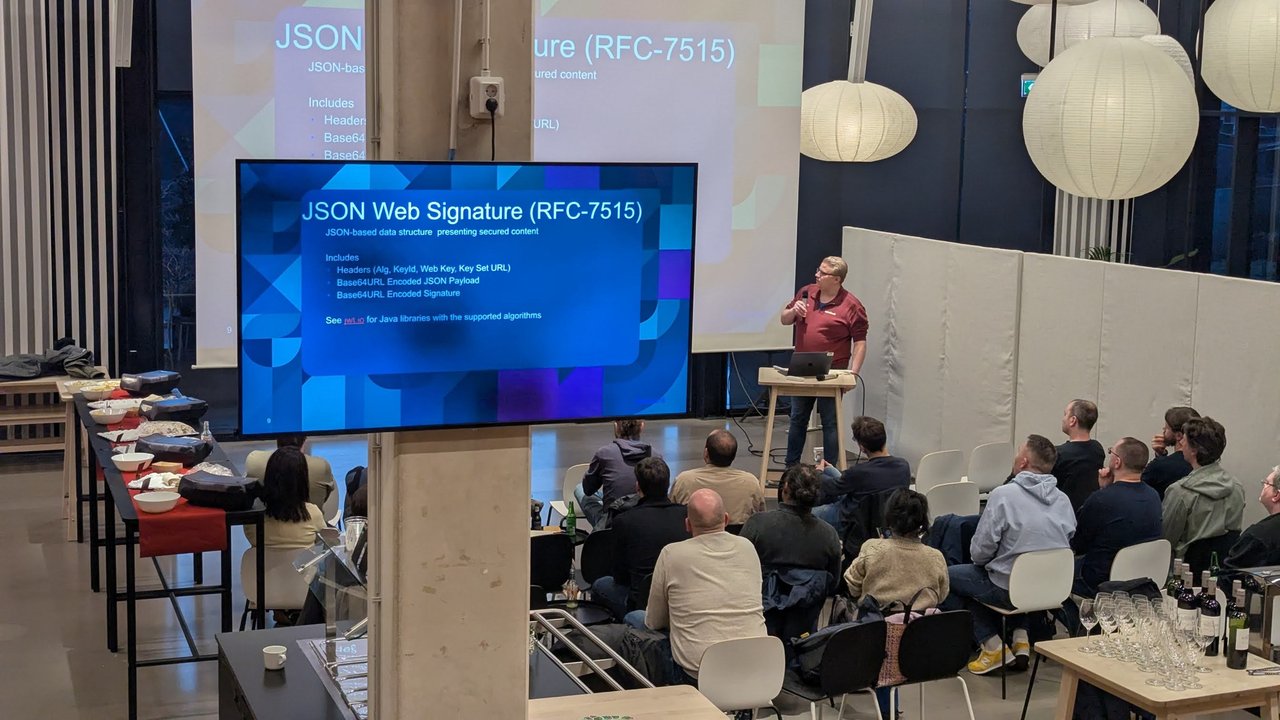
The JSON Web Signature slide from the elliptic curve cryptography talk at the Amsterdam Java User Group meetup at IKEA, with headers, payload and signature, and a pointer to jwt.io for Java libraries.
The JWS structure
A JWS in compact serialization has three Base64URL-encoded parts separated by dots:
RFC 7515 compact serialization has exactly three parts: BASE64URL(UTF8(header)), BASE64URL(payload), and BASE64URL(signature). The signing input is the first two parts joined with a dot.
eyJhbGciOiJSUzI1NiIsImtpZCI6IjEyMzQifQ.eyJzdWIiOiJ1c2VyMSIsInJvbGUiOiJhZG1pbiJ9.signature
  │                                          │                                          │
  Header (Base64URL)                         Payload (Base64URL)                        Signature (Base64URL)
Part 1: The JOSE Header
The header describes how the content is secured:
{
  "alg": "RS256",
  "kid": "2026-signing-key-1",
  "jku": "https://auth.example.com/.well-known/jwks.json",
  "jwk": {
    "kty": "RSA",
    "n": "0vx7agoebGcQ...",
    "e": "AQAB"
  },
  "typ": "JWT"
}
Key header parameters:
| Parameter | Name | Purpose |
|---|---|---|
alg | Algorithm | The cryptographic algorithm used to secure the JWS (required) |
kid | Key ID | Identifies which key was used — critical for key rotation |
jwk | JSON Web Key | The public key itself, embedded in the header |
jku | JWK Set URL | URL pointing to a set of keys (JWKS endpoint) |
typ | Type | Media type, usually “JWT” |
cty | Content Type | Type of the payload when nested |
x5u | X.509 URL | URL for the X.509 certificate chain |
x5c | X.509 Chain | The certificate chain itself |
The alg parameter is always required. The others depend on your key distribution strategy.
Part 2: The Payload
The payload is the actual content you are signing. It can be any data — not just JSON claims:
{
  "sub": "user-12345",
  "iss": "https://auth.example.com",
  "aud": "https://api.example.com",
  "exp": 1774070400,
  "iat": 1773984000,
  "role": "admin",
  "tenant": "acme-corp"
}
The payload is Base64URL-encoded but not encrypted. Anyone can decode it. The signature only guarantees integrity and authenticity — not confidentiality. If you need encryption, use JWE (RFC 7516).
Part 3: The Signature
The signature is computed over the header and payload:
signature = SIGN(
    Base64URL(header) + "." + Base64URL(payload),
    signing_key
)
The verifier reconstructs this input and checks the signature against the public key or shared secret.
Supported algorithms
JWS supports three families of algorithms:
HMAC (symmetric)
HS256 — HMAC using SHA-256
HS384 — HMAC using SHA-384
HS512 — HMAC using SHA-512
Same key signs and verifies. Simple, fast, but the secret must be shared between parties.
RSA (asymmetric)
RS256 — RSASSA-PKCS1-v1_5 using SHA-256
RS384 — RSASSA-PKCS1-v1_5 using SHA-384
RS512 — RSASSA-PKCS1-v1_5 using SHA-512
PS256 — RSASSA-PSS using SHA-256
PS384 — RSASSA-PSS using SHA-384
PS512 — RSASSA-PSS using SHA-512
Private key signs, public key verifies. The PS* variants use probabilistic padding and are considered more secure.
Elliptic Curve (asymmetric)
ES256  — ECDSA using P-256 and SHA-256
ES384  — ECDSA using P-384 and SHA-384
ES512  — ECDSA using P-521 and SHA-512
EdDSA  — Edwards-curve DSA (Ed25519 / Ed448)
Smaller keys, faster operations than RSA. EdDSA (Ed25519) is the modern recommendation for new systems.
The “none” algorithm
none — No digital signature or MACNever accept this in production. The none algorithm means the JWS is unsigned. It exists for testing only. Accepting none has caused critical vulnerabilities in JWT libraries.
Java implementation
The jwt.io website lists Java libraries with their supported algorithms. The three main options:
1. jjwt (io.jsonwebtoken)
The most popular Java JWT library:
<dependency>
    <groupId>io.jsonwebtoken</groupId>
    <artifactId>jjwt-api</artifactId>
    <version>0.12.6</version>
</dependency>
<dependency>
    <groupId>io.jsonwebtoken</groupId>
    <artifactId>jjwt-impl</artifactId>
    <version>0.12.6</version>
    <scope>runtime</scope>
</dependency>
<dependency>
    <groupId>io.jsonwebtoken</groupId>
    <artifactId>jjwt-jackson</artifactId>
    <version>0.12.6</version>
    <scope>runtime</scope>
</dependency>
Creating a JWS:
import io.jsonwebtoken.Jwts;
import io.jsonwebtoken.security.Keys;
import java.security.KeyPair;

// Generate an RSA key pair
KeyPair keyPair = Keys.keyPairFor(SignatureAlgorithm.RS256);

// Create a signed JWS
String jws = Jwts.builder()
    .header()
        .keyId("2026-signing-key-1")
        .and()
    .subject("user-12345")
    .issuer("https://auth.example.com")
    .audience().add("https://api.example.com").and()
    .issuedAt(new Date())
    .expiration(Date.from(Instant.now().plus(1, ChronoUnit.HOURS)))
    .claim("role", "admin")
    .claim("tenant", "acme-corp")
    .signWith(keyPair.getPrivate())
    .compact();

System.out.println(jws);
// eyJraWQiOiIyMDI2LXNpZ25pbmcta2V5LTEi...
Verifying a JWS:
import io.jsonwebtoken.Claims;
import io.jsonwebtoken.Jws;

Jws<Claims> parsed = Jwts.parser()
    .verifyWith(keyPair.getPublic())
    .requireIssuer("https://auth.example.com")
    .requireAudience("https://api.example.com")
    .build()
    .parseSignedClaims(jws);

Claims claims = parsed.getPayload();
String subject = claims.getSubject();     // "user-12345"
String role = claims.get("role", String.class); // "admin"
2. Nimbus JOSE+JWT
More comprehensive — supports the full JOSE stack (JWS, JWE, JWK, JWT):
import com.nimbusds.jose.*;
import com.nimbusds.jose.crypto.*;
import com.nimbusds.jwt.*;

// Create RSA key
RSAKey rsaKey = new RSAKeyGenerator(2048)
    .keyID("2026-signing-key-1")
    .generate();

// Build and sign
SignedJWT signedJWT = new SignedJWT(
    new JWSHeader.Builder(JWSAlgorithm.RS256)
        .keyID(rsaKey.getKeyID())
        .build(),
    new JWTClaimsSet.Builder()
        .subject("user-12345")
        .issuer("https://auth.example.com")
        .expirationTime(Date.from(Instant.now().plus(1, ChronoUnit.HOURS)))
        .claim("role", "admin")
        .build()
);

signedJWT.sign(new RSASSASigner(rsaKey));
String serialized = signedJWT.serialize();

// Verify
SignedJWT received = SignedJWT.parse(serialized);
boolean valid = received.verify(new RSASSAVerifier(rsaKey.toPublicJWK()));
3. jose4j
From BitBucket, lightweight and standards-focused:
import org.jose4j.jws.JsonWebSignature;
import org.jose4j.jws.AlgorithmIdentifiers;
import org.jose4j.keys.RsaKeyUtil;

RsaKeyUtil keyUtil = new RsaKeyUtil();
KeyPair keyPair = keyUtil.generateKeyPair(2048);

JsonWebSignature jws = new JsonWebSignature();
jws.setPayload("{\"sub\":\"user-12345\",\"role\":\"admin\"}");
jws.setAlgorithmHeaderValue(AlgorithmIdentifiers.RSA_USING_SHA256);
jws.setKey(keyPair.getPrivate());
jws.setKeyIdHeaderValue("2026-signing-key-1");

String serialized = jws.getCompactSerialization();
Algorithm selection guide
Use case                          Recommended algorithm
───────────────────────────────────────────────────────
Service-to-service (same system)  HS256 (shared secret)
Public API / OAuth2               RS256 or PS256
New systems (2026+)               EdDSA (Ed25519)
Constrained devices / IoT         ES256 (smaller keys)
Legacy compatibility              RS256
EdDSA (Ed25519) is the modern choice: fastest signature generation, smallest keys, strong security properties. Java 15+ supports it natively.
// EdDSA with jjwt
KeyPair ed25519 = Keys.keyPairFor(SignatureAlgorithm.EdDSA);
String jws = Jwts.builder()
    .subject("user-12345")
    .signWith(ed25519.getPrivate())
    .compact();
Key management patterns
Key rotation with kid
The kid (Key ID) header lets you rotate keys without breaking existing tokens:
// JWKS endpoint returns multiple keys
{
  "keys": [
    {"kid": "2026-q1", "kty": "RSA", ...},  // Current signing key
    {"kid": "2025-q4", "kty": "RSA", ...}   // Previous key (still validates)
  ]
}
Verification flow:
- Parse JWS header, read
kid - Fetch JWKS from
jkuURL (with caching) - Find matching key by
kid - Verify signature
// Nimbus JWKS key resolution
JWKSource<SecurityContext> keySource = new RemoteJWKSet<>(
    new URL("https://auth.example.com/.well-known/jwks.json")
);
JWSKeySelector<SecurityContext> keySelector =
    new JWSVerificationKeySelector<>(JWSAlgorithm.RS256, keySource);
JKU (JWK Set URL) security
The jku header tells the verifier where to find the signing keys. This is powerful but dangerous — if an attacker controls this URL, they can sign anything:
// ALWAYS validate the jku URL against an allowlist
Set<String> trustedIssuers = Set.of(
    "https://auth.example.com/.well-known/jwks.json",
    "https://auth.staging.example.com/.well-known/jwks.json"
);

String jku = header.getJWKURL().toString();
if (!trustedIssuers.contains(jku)) {
    throw new SecurityException("Untrusted JKU: " + jku);
}
Common security mistakes
1. Algorithm confusion attack
// WRONG: Accept any algorithm the token claims
Jwts.parser().build().parseSignedClaims(token);

// RIGHT: Explicitly require the expected algorithm
Jwts.parser()
    .verifyWith(publicKey)  // Implicitly restricts to asymmetric algs
    .build()
    .parseSignedClaims(token);
2. Not validating claims
// WRONG: Only verify signature
Jws<Claims> jws = parser.parseSignedClaims(token);

// RIGHT: Validate issuer, audience, and expiration
Jwts.parser()
    .verifyWith(publicKey)
    .requireIssuer("https://auth.example.com")
    .requireAudience("https://api.example.com")
    .build()
    .parseSignedClaims(token);
// Expiration is checked automatically by jjwt
3. Using HS256 with a weak secret
// WRONG: Short or predictable secret
byte[] secret = "mysecret".getBytes();

// RIGHT: Cryptographically random, full-length key
SecretKey key = Keys.secretKeyFor(SignatureAlgorithm.HS256); // 256 bits
JWS beyond JWT
JWS is not limited to JWT claims. You can sign any payload:
// Sign an API request body
String requestBody = "{\"amount\":100,\"currency\":\"EUR\",\"to\":\"NL91ABNA0417164300\"}";

String signedRequest = Jwts.builder()
    .content(requestBody, "application/json")
    .signWith(privateKey)
    .compact();

// Receiver verifies the payment request was not tampered with
Use cases beyond authentication:
- Webhook signatures — prove the webhook came from your service
- Document signing — tamper-proof contracts and agreements
- API request integrity — sign request bodies for financial APIs
- Configuration distribution — signed config files that cannot be modified in transit
My take
JWS (RFC 7515) is the foundation that JWT, OAuth 2.0, and OpenID Connect are built on. Understanding it at this level — headers, algorithms, key management — makes you much more effective at debugging authentication issues and designing secure API architectures.
For new Java projects in 2026: use EdDSA for signatures, jjwt for simplicity or Nimbus JOSE for full JOSE stack support, always pin your expected algorithm, and implement key rotation from day one.
Check jwt.io for the complete library comparison and interactive token debugger.
Need help designing secure API authentication or implementing zero-trust architecture? Get in touch for security consulting and architecture reviews.