
This morning my Hermes agent told me two things. Its chat answered every message with RuntimeStoreError: runtime_draining. And the cron list showed two jobs “running” for 136 and 226 minutes. Another two jobs had failed 19 nights in a row.
All of them point to the same place: the local model behind Hermes is too slow for what the scheduled jobs ask of it. Here is what I saw, what I did right away, and what I am checking next.
What the symptoms looked like
runtime_draining: the gateway is restarting and does not accept new requests. It comes back when the restart ends. It is not a bug in your message.Provider has been unresponsive (no response received) for 5 consecutive stale attempts: Hermes gave up on the model after five attempts with no answer, to avoid stalling forever. The advice in the message (“switch models or start a new session”) is generic. The model was not down, it was slow.cron fire ownership was lost: Hermes stopped a job because it no longer owned the run, which can happen when the gateway restarts mid-run. Twenty failures in a row for one job.Context window was full: a long chat on a 65,536-token context. Compacting failed because the model could not summarize it in time.
The number that explains most of it
My Hermes runs on a Mac mini with a 27B Qwen model served by Ollama on 127.0.0.1:11434. The gateway log shows the context length it detected, 65,536 tokens. Then I sent the simplest possible test, “in two short sentences, who am I and name three of your skills”, and the log recorded:
API call #1: in=13460 out=119 latency=148.7sThe answer was 119 tokens. But the request carried 13,460 tokens of input: the system prompt, the memory and the tool definitions, before my question. On a local model, that prompt has to be processed on every fresh turn, and it took two and a half minutes for a two-sentence reply.
A cron job is not one turn. It is dozens of tool calls, each one sending a growing history. At that speed a job that should take minutes takes hours, and the “5 stale attempts” check fires before it finishes. This is my reading of the log, not a measured profile, so I treat it as the first thing to test rather than a closed case. The dashboard below shows the effect on the server.
The Grafana dashboard says the same thing
My homelab dashboard shows the Mac mini over the last 12 hours:
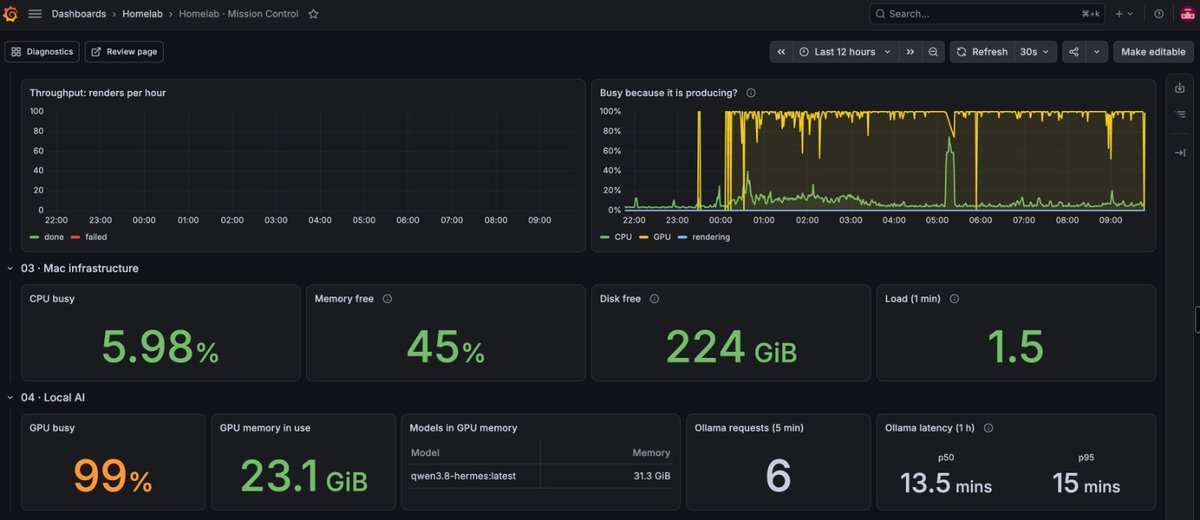
- GPU busy: 99%. The GPU line in the “Busy because it is producing?” panel sits at the top for hours, so the model is working, not idle.
- One model in GPU memory:
qwen3.8-hermes:latest, 31.3 GiB. - Ollama requests (5 min): 6. Several requests were in flight at once on one server.
- Ollama latency over one hour: p50 13.5 minutes, p95 15 minutes. A single request takes more than ten minutes.
- CPU busy: 5.98%, memory free: 45%, disk free: 224 GiB. Nothing else on the Mac is short of resources.
So the model is not stuck or broken. The GPU is saturated with long requests, and new ones queue behind them. That fits the 5 stale attempts: a request that waits 13 minutes gives Hermes nothing to read in time.
Fix 1: pause the jobs from the terminal
The chat is unusable while the gateway restarts, but the CLI works. List the jobs, then pause the ones that stall:
hermes cron list
hermes cron pause <job-id>
If pause does not accept the ID, use the job name in quotes. Pausing applies to the next runs. Runs already in progress are closed by the gateway restart, or by restarting Ollama. To bring a job back:
hermes cron resume <job-id>hermes cron list shows [paused] next to the job, which is how I checked it. I paused the two jobs that were stuck and left the rest alone, including the daily backup.
Fix 2: start a clean chat
When the chat says Context window was full and /compact fails, stop retrying it. Use /reset after the gateway is back. A fresh session starts from the base prompt instead of the 60,000-token history.
What I am checking next
- Prompt size per turn. 13k tokens of fixed input is a lot for a local model. Fewer enabled tools and a shorter memory both lower it. Hermes already defers some tool schemas, so look at what is still loaded for the cron profile.
- Overlap. Several jobs scheduled close together share one Ollama server. Spread them out, so two long jobs do not wait on each other.
- A faster model for cron. A smaller model that handles tools well is better for unattended work than a big one that finishes after the timeout. I covered the tool-calling side in the Continue + Ollama read_file post.
- A dead external dependency. A job that calls a remote MCP server behind an access gate can fail for a reason that has nothing to do with the model. Check the log for
403lines before blaming Ollama.
Frequently asked questions
Does pausing a cron job delete it? No. The job and its schedule stay, and hermes cron resume <id> brings it back.
Why did the paused job keep running? Pause stops future runs. The run already in progress ends when the gateway restarts or when Ollama is restarted.
Is runtime_draining an error I need to fix? No. It means the gateway is restarting. Wait, then retry or /reset.
Key takeaways
runtime_drainingis a restart in progress, and “Provider has been unresponsive” means a slow model, not a dead one.- In my log, a two-sentence answer cost 13,460 input tokens and 148.7 seconds on a local 27B model. Cron jobs multiply that.
hermes cron list,pauseandresumework from the terminal while the chat is unavailable.- Pause only the jobs that stall, keep the ones that do not need the model, such as backups, then reduce the prompt, spread the schedule, or use a faster model.
Sources
- Hermes gateway log (
~/.hermes/logs/agent.log) on my Mac mini, November 13-14, 2026 - Ollama context length