This is a practical guide to Entra ID access packages and PIM (Privileged Identity Management) as the way to give a platform team least-privilege Azure access: nobody holds standing admin rights, the Product Owner approves who gets what, access expires on its own, and production rights are activated just-in-time. I’ll cover the building blocks, a reference design, Terraform and Microsoft Graph automation, licensing, and the pitfalls.
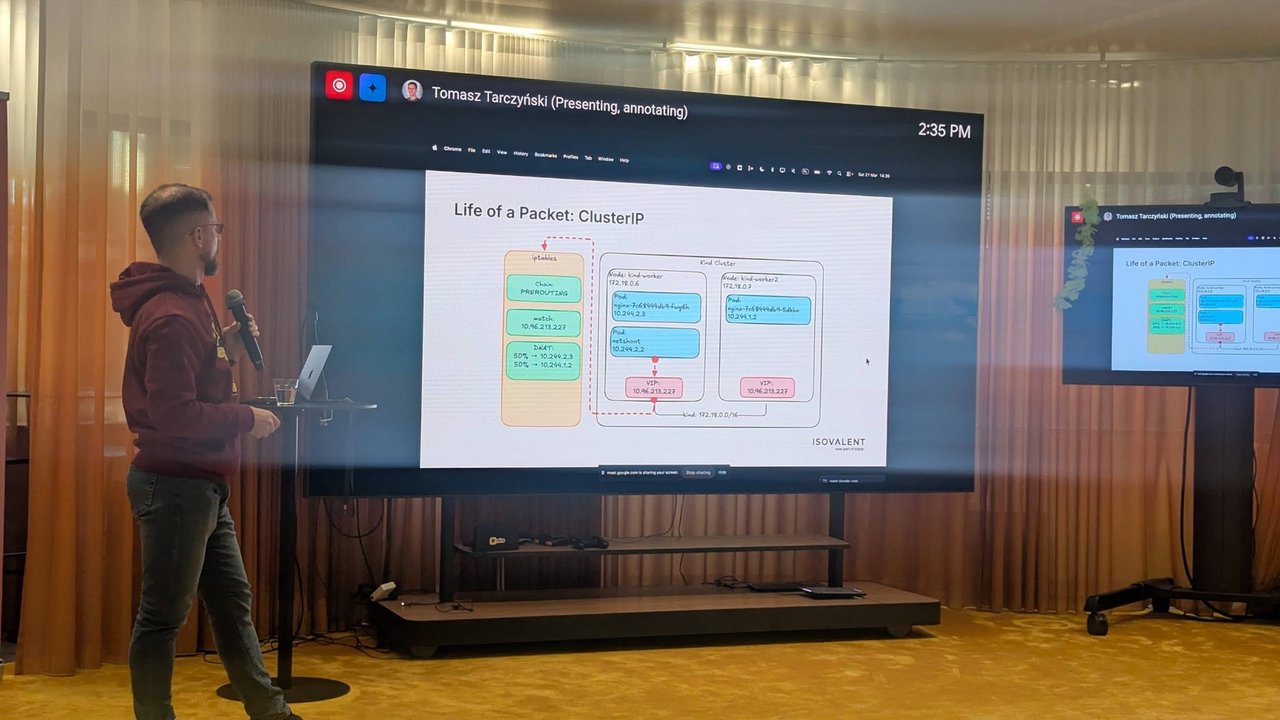
Henry Been’s talk at BitBash 2025 in Veenendaal got me thinking about this. I wrote it up in my BitBash 2025 recap. His requirement that “permissions are given out by the PO, not by some administrator or the team itself” is the design goal I build towards below.
Verification note: I don’t have an Entra ID tenant to test this against. Everything below is docs-verified against Microsoft Learn (page dates are listed at the end), and the Terraform was checked with terraform validate against azuread 3.10.0 and azurerm 5.8.0. Run terraform plan in a test tenant before you rely on it.
The problem: standing rights and nested groups
Most Azure estates I review grant access the same way. Someone creates a group, nests it into another group, gives that group Owner or Contributor on a subscription, and adds people. Two years later nobody knows why a given engineer can delete production.
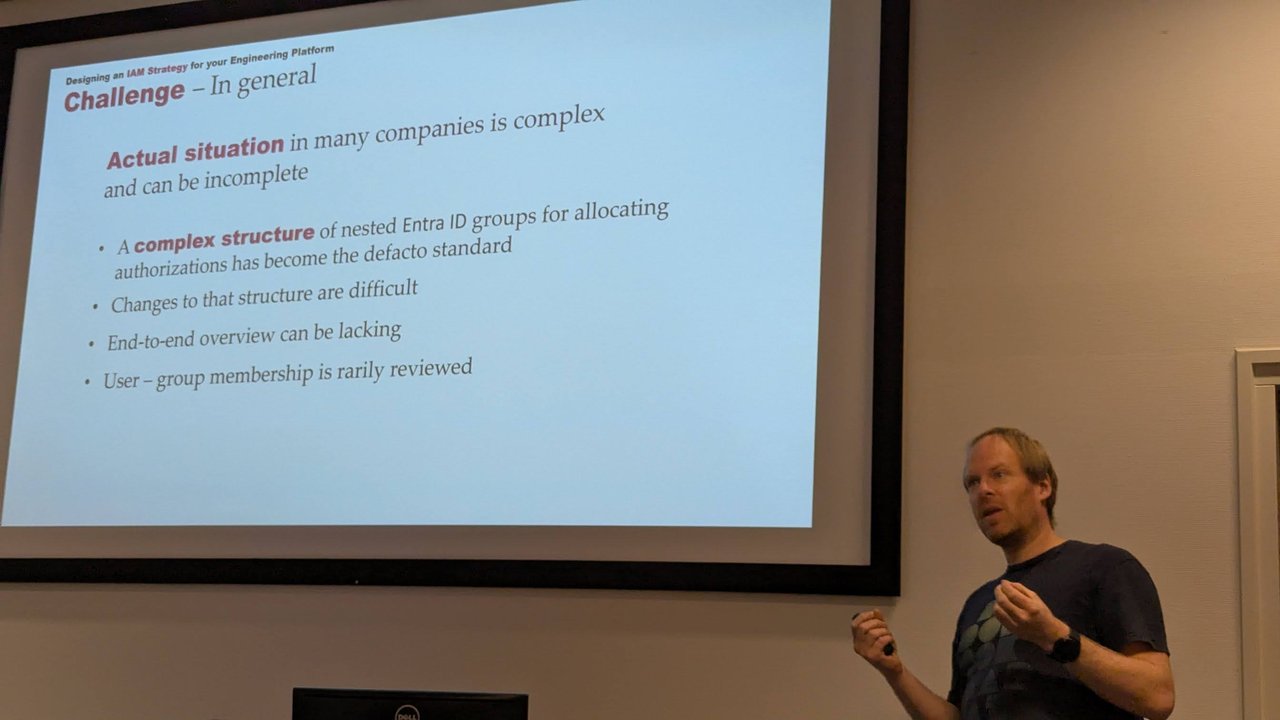
A slide from Henry Been’s talk at BitBash 2025: nested Entra ID groups, hard-to-change structures, no end-to-end overview, and user–group membership that is rarely reviewed.
The fix has two parts. Entitlement management decides who may hold access, approved by whom, and for how long. PIM decides when privileged access is actually switched on.
Entra ID Governance entitlement management
Here are the terms you need, from the entitlement management overview:
- Catalog: a container of resources and access packages. Catalogs are the delegation boundary. An administrator can add any resource, but a non-administrator catalog owner can only add resources they own.
- Access package: a bundle of resource roles. Supported resources include membership of Entra security groups, Microsoft 365 groups and Teams, enterprise application roles, and SharePoint Online sites.
- Policy: who can request, who approves, and how long the assignment lasts. One access package can have several policies.
- Request and assignment: a request goes through approval. If it’s approved, the user gets an assignment, which typically expires.
- Access reviews: recurring reviews of the assignments, configured on the policy.
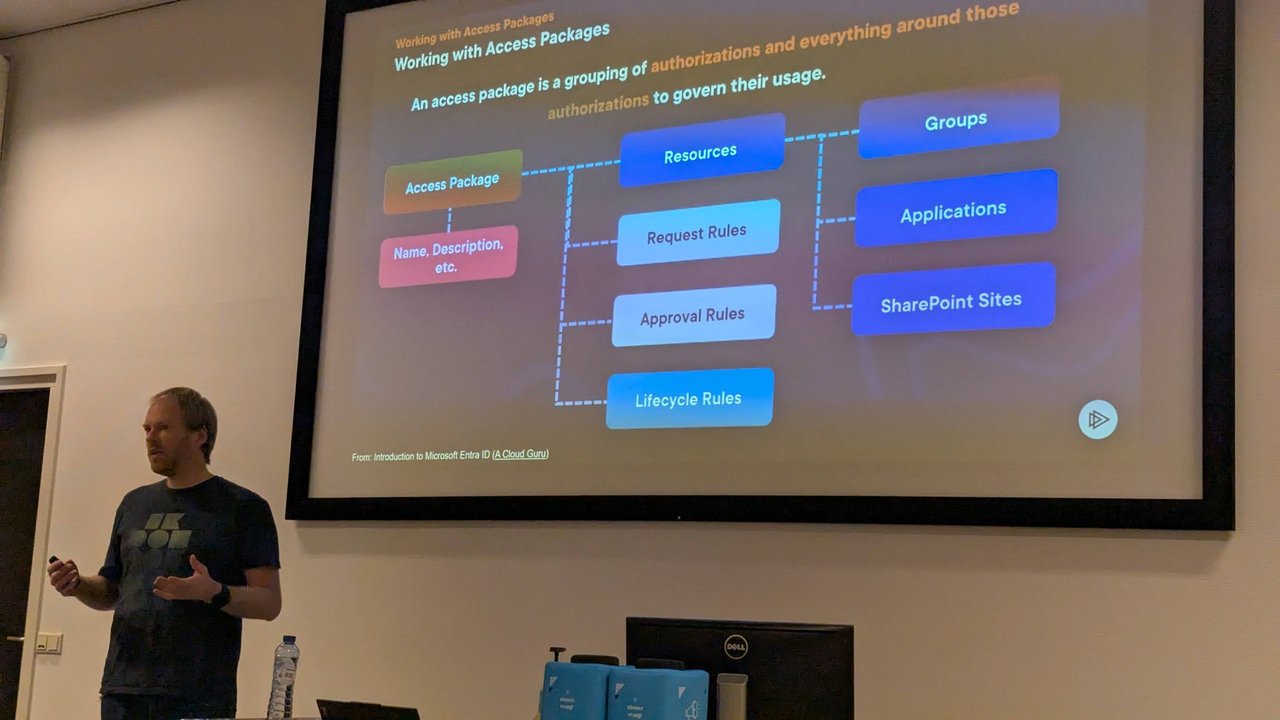
A slide from the same talk: an access package bundles resources (groups, applications, SharePoint sites) with request, approval and lifecycle rules.
Azure RBAC roles aren’t a resource type in an access package. The documented pattern is indirect: put a security group in the package and give that group an Azure role assignment. That’s what the design below does.
PIM: eligible vs active, and Azure vs Entra roles
PIM has two assignment types. An active assignment works immediately. An eligible assignment has to be activated first, and activation can require MFA, a justification, a ticket number or approval. The docs make one point that’s easy to miss: an eligible assignment grants exactly the same access once it’s active. The only difference is that the user doesn’t hold it all the time.
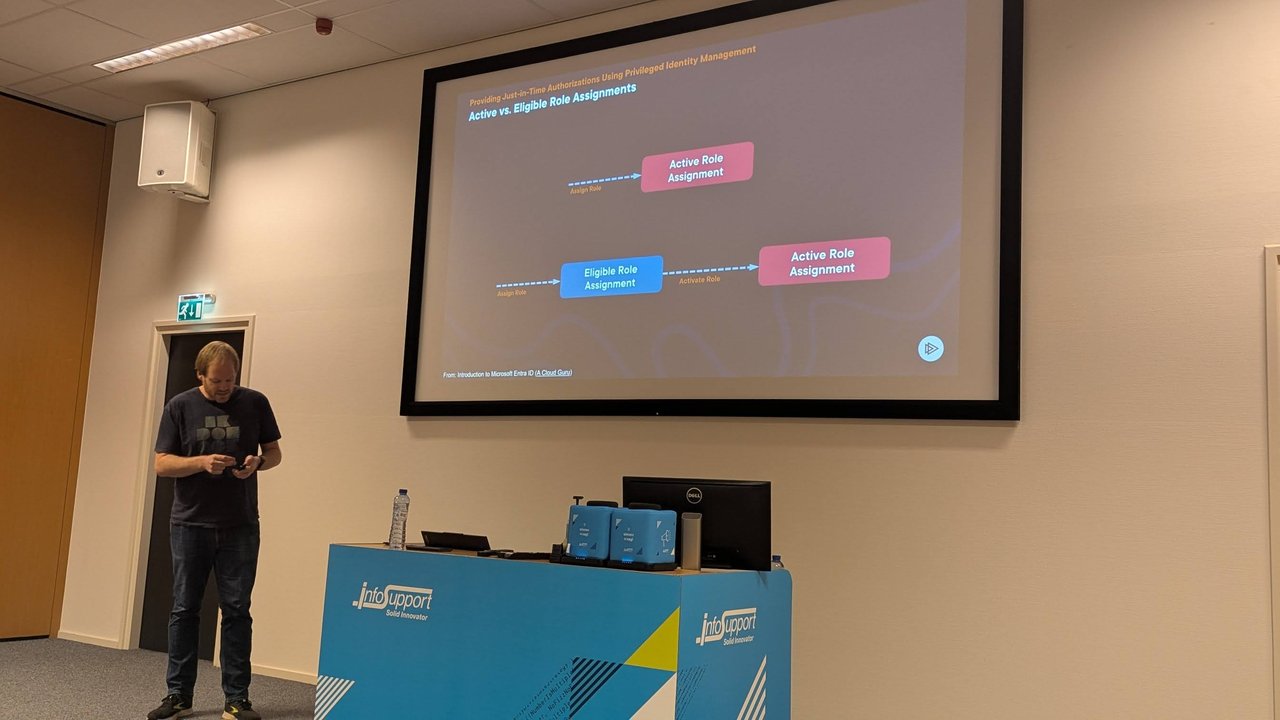
A slide from the talk: an eligible role assignment becomes active only after activation.
PIM covers three kinds of target, and they don’t behave identically:
| Target | Scope | Notes from the docs |
|---|---|---|
| Microsoft Entra roles | Directory | Approval without configured approvers falls back to Privileged Role Administrators and Global Administrators |
| Azure resource roles | Management group, subscription, resource group, resource | Settings are per role and per resource, and are not inherited from a subscription down to its resource groups. There are no default approvers |
| PIM for Groups | A security or Microsoft 365 group | Separate policies for membership and ownership. Dynamic and on-premises-synced groups can’t be enabled |
For both Entra and Azure resource roles, the activation maximum duration can be from 1 to 24 hours (Entra roles, Azure resources). In Terraform, maximum_duration accepts PT30M to PT23H30M in 30-minute steps, or one day.
A reference design: the Product Owner approves
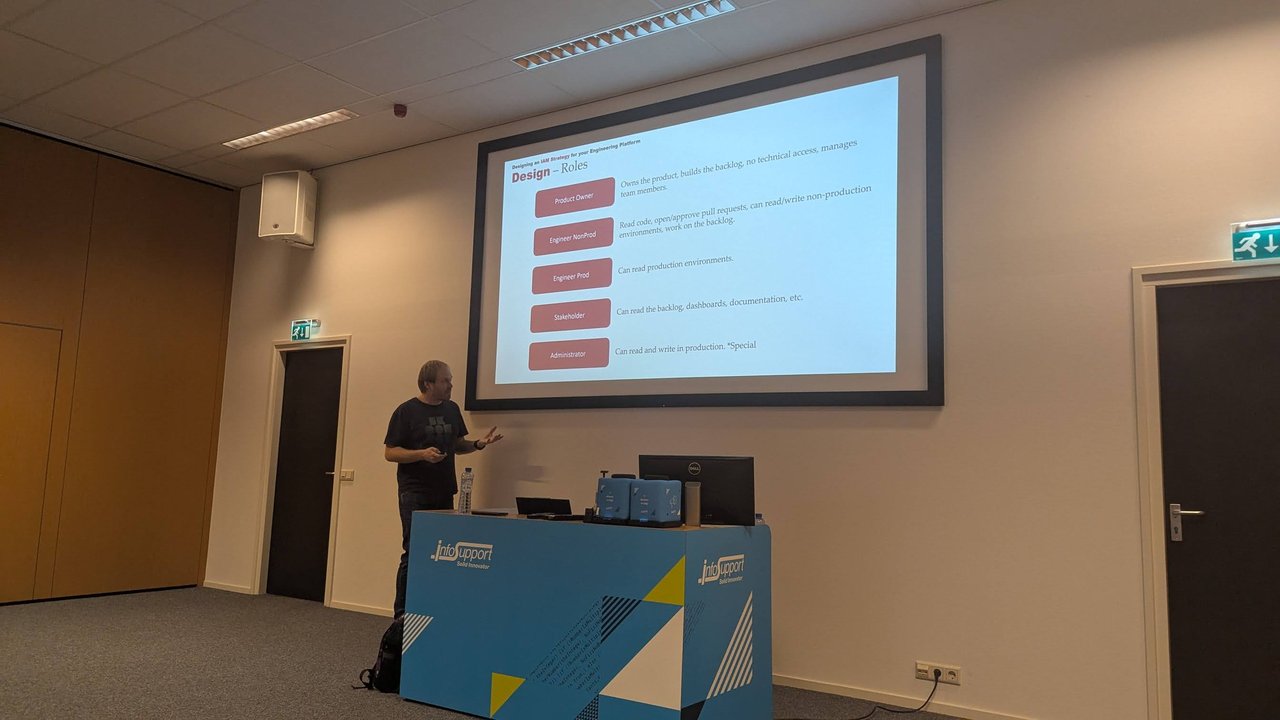
The talk mapped team roles to access: Product Owner, Engineer NonProd, Engineer Prod, Stakeholder and a special-case Administrator. Here is how I turn that into Azure resources for one product, “Payments”.
| Group | Azure role | How users get in |
|---|---|---|
payments-engineer-nonprod | Contributor on the non-prod subscription | Access package “Engineer NonProd”, 180 days |
payments-engineer-prod-read | Reader on the prod subscription | Access package “Engineer Prod”, 90 days |
payments-prod-operator-candidates | none | Same “Engineer Prod” package |
payments-prod-operator (role-assignable, PIM-managed) | Contributor on the prod subscription | Just-in-time: the candidates group is an eligible member |
Write access to production comes from nested eligibility. The PIM for Groups docs state that if a user is an active member of group A, and group A is an eligible member of group B, the user can activate their own membership in B. That activation applies only to the user who requested it, not to the whole of group A. So the PO decides who is a candidate, PIM decides when a candidate is an operator, and when the access package expires the user stops being a candidate.
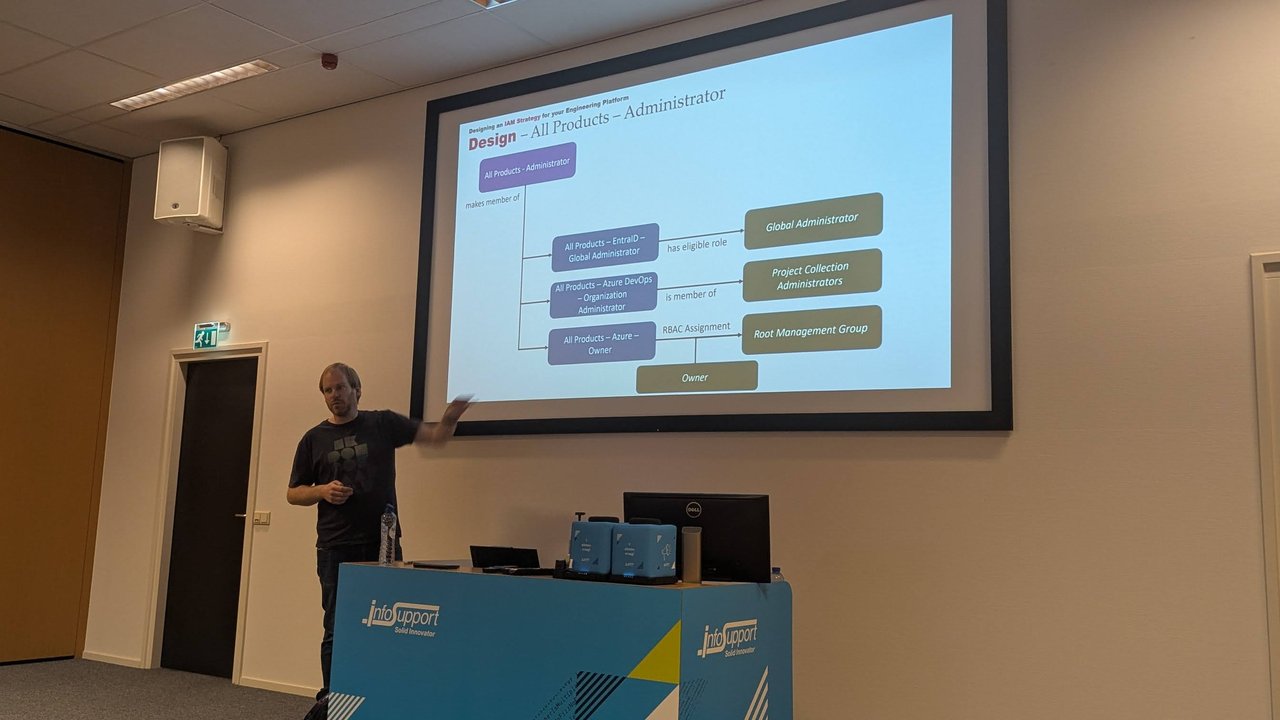
A slide from the talk: one package makes the user a member of three groups, linked by “has eligible role”, “is member of” and “RBAC Assignment”.
I made payments-prod-operator role-assignable even though it never gets an Entra role. Microsoft recommends this for groups that grant sensitive access, because only Global Administrators, Privileged Role Administrators and the group owner can manage it, and lower-privileged admins can’t reset its members’ credentials. A role-assignable group can’t have active nested groups, but eligible nesting is allowed.
Automating it with Terraform
These are the resources I used, all checked against the provider docs and source at azuread v3.10.0 and azurerm v5.8.0. The groups, data sources and variables are left out for space. The full file passes terraform validate.
# Azure RBAC: roles go to groups, never to people
resource "azurerm_role_assignment" "prod_operator" {
  scope                = data.azurerm_subscription.prod.id
  role_definition_name = "Contributor"
  principal_id         = azuread_group.prod_operators.object_id
  principal_type       = "Group"
}

# PIM for Groups: rules for activating *membership* of prod_operators
resource "azuread_group_role_management_policy" "prod_operators_member" {
  group_id = azuread_group.prod_operators.object_id
  role_id  = "member"

  activation_rules {
    maximum_duration                   = "PT2H"
    require_justification              = true
    require_multifactor_authentication = true
  }

  eligible_assignment_rules {
    expiration_required = false # the candidates group stays eligible
  }

  active_assignment_rules {
    expire_after = "P15D" # caps any direct active assignment
  }
}

# The candidates group is an eligible member of prod_operators
resource "azuread_privileged_access_group_eligibility_schedule" "candidates" {
  group_id             = azuread_group.prod_operators.object_id
  principal_id         = azuread_group.prod_operator_candidates.object_id
  assignment_type      = "member"
  permanent_assignment = true
  justification        = "Candidates are governed by the Engineer Prod access package"

  depends_on = [azuread_group_role_management_policy.prod_operators_member]
}
azuread_group_role_management_policy doesn’t create a policy. Entra ID creates one for each group and role automatically, and the resource adopts it on first use. require_multifactor_authentication conflicts with required_conditional_access_authentication_context, so set only one of them. The entitlement management side looks like this:
resource "azuread_access_package_catalog" "payments" {
  display_name = "Payments"
  description  = "Access for the Payments product team"
}

resource "azuread_access_package_resource_catalog_association" "groups" {
  for_each               = local.catalog_groups # map of name => group object_id
  catalog_id             = azuread_access_package_catalog.payments.id
  resource_origin_id     = each.value
  resource_origin_system = "AadGroup"
}

resource "azuread_access_package" "pkg" {
  for_each     = local.packages
  catalog_id   = azuread_access_package_catalog.payments.id
  display_name = each.value.name
  description  = "${each.value.name}, approved by the Product Owner"
}

resource "azuread_access_package_resource_package_association" "pkg" {
  for_each                        = local.package_groups
  access_package_id               = azuread_access_package.pkg[each.value.package].id
  catalog_resource_association_id = azuread_access_package_resource_catalog_association.groups[each.value.group].id
  access_type                     = "Member"
}

resource "azuread_access_package_assignment_policy" "po_approval" {
  for_each          = local.packages
  access_package_id = azuread_access_package.pkg[each.key].id
  display_name      = "Engineers request, PO approves"
  description       = "Single-stage approval by the Product Owner"
  duration_in_days  = each.value.days
  extension_enabled = true

  requestor_settings {
    scope_type = "SpecificDirectorySubjects"
    requestor {
      subject_type = "groupMembers"
      object_id    = var.engineering_group_object_id
    }
  }

  approval_settings {
    approval_required                = true
    approval_required_for_extension  = true
    requestor_justification_required = true

    approval_stage {
      approval_timeout_in_days        = 7
      approver_justification_required = true
      primary_approver {
        subject_type = "singleUser"
        object_id    = data.azuread_user.po.object_id
      }
    }
  }

  assignment_review_settings {
    enabled                         = true
    review_frequency                = "quarterly"
    duration_in_days                = 14
    review_type                     = "Reviewers"
    access_review_timeout_behavior  = "removeAccess"
    access_recommendation_enabled   = true
    approver_justification_required = true
    reviewer {
      subject_type = "singleUser"
      object_id    = data.azuread_user.po.object_id
    }
  }
}
What matters in the policy:
scope_type = "SpecificDirectorySubjects"with agroupMembersrequestor limits who can request the package.AllExistingDirectoryMemberUserswould open it to every member user, which also affects licensing (see below).approval_timeout_in_days: a request that isn’t approved in time is automatically rejected.duration_in_days: the assignment expires, so the user leaves the groups.extension_enabledlets users ask for an extension, andapproval_required_for_extensionsends that request to the PO again.access_review_timeout_behavior = "removeAccess": if the PO ignores the quarterly review, access is removed rather than kept.
For Azure roles assigned directly to people or groups, rather than through a PIM group, azurerm has azurerm_pim_eligible_role_assignment and azurerm_role_management_policy. Keep in mind that the policy has to be set at every scope you assign at, because Azure PIM settings aren’t inherited. For Entra roles, azuread has azuread_directory_role_eligibility_schedule_request.
Automating it with Microsoft Graph
The same flows exist in Graph v1.0. An engineer requesting a package for themselves needs the delegated permission EntitlementMgmt-SubjectAccess.ReadWrite, not an admin role:
POST https://graph.microsoft.com/v1.0/identityGovernance/entitlementManagement/assignmentRequests
Content-Type: application/json

{
  "requestType": "userAdd",
  "assignment": {
    "targetId": "<user-object-id>",
    "assignmentPolicyId": "<policy-id>",
    "accessPackageId": "<access-package-id>"
  },
  "justification": "On-call rotation for Payments, Q4"
}
After PO approval, the candidate activates operator membership for two hours:
POST https://graph.microsoft.com/v1.0/identityGovernance/privilegedAccess/group/assignmentScheduleRequests
Content-Type: application/json

{
  "accessId": "member",
  "principalId": "<user-object-id>",
  "groupId": "<payments-prod-operator-object-id>",
  "action": "selfActivate",
  "scheduleInfo": {
    "startDateTime": "2026-10-02T09:00:00Z",
    "expiration": { "type": "afterDuration", "duration": "PT2H" }
  },
  "justification": "INC-1234: scale the payments API"
}
How to verify it works
- As the engineer,
GET /identityGovernance/entitlementManagement/assignments/filterByCurrentUser(on='target')should show the assignment withstatedelivered.pendingApprovalon the request means the PO hasn’t acted yet. GET /identityGovernance/privilegedAccess/group/assignmentScheduleInstances?$filter=groupId eq '<group-id>'lists active memberships. This method requires that filter.- In the Azure portal, Access control (IAM) > View my access on the prod subscription shows your current role assignments. After activation, Contributor should appear through
payments-prod-operator. - After two hours, the membership should be gone. Apps can cache role state, so signing out and back in can help.
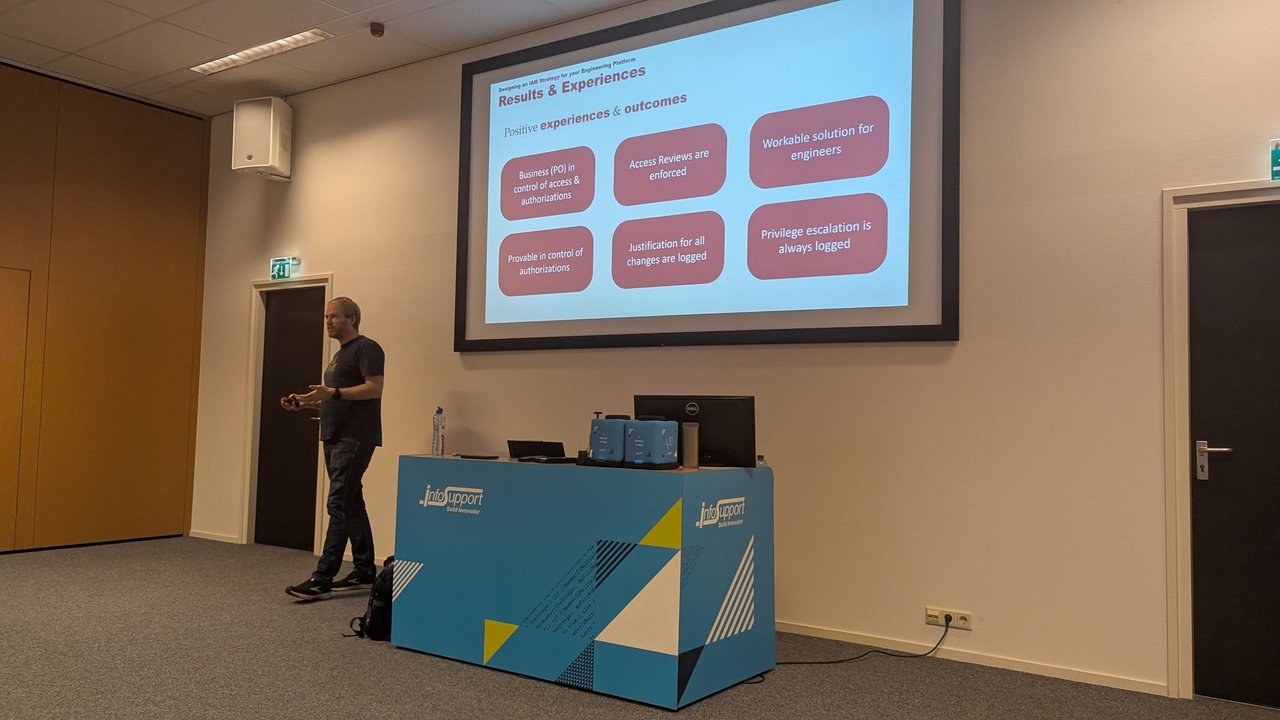
A slide from the talk: the outcomes, including PO control, enforced access reviews and logged privilege escalation.
Licensing, stated carefully
From licensing fundamentals (page dated 2026-07-29):
- PIM, including PIM for Groups: Entra ID P2 or Entra ID Governance. You need licenses for users with eligible or time-bound assignments, approvers, reviewers and users being reviewed.
- Entitlement management: the docs say it requires Entra ID Governance or Entra Suite for the member users in scope, and that “some capabilities” work with P2. The table lists groups, apps and SharePoint sites in packages, approvals, expiration and separation of duties under P2. Eligible group membership inside access packages, auto-assignment policies and custom extensions are Governance-only. Microsoft also says no new governance features will be added to P2.
- Licensing counts people in scope, not people who actually request access. In Microsoft’s example, 2,000 employees who can request a package need 2,000 licenses, even if only 150 request it.
My take: check your own agreement with your Microsoft contact. The nested-eligibility design above deliberately stays within the features listed under P2.
Pitfalls
- Lockout on Entra roles. If every Global Administrator and Privileged Role Administrator is only eligible, activation requires approval, and no approvers are configured, you are locked out. Keep emergency access accounts.
- Approver bottleneck. One PO as the only approver means requests are rejected while they’re on holiday. Add
alternative_approverblocks or use agroupMembersapprover. - Provider examples vs schema. Several azuread examples pass
azuread_group.x.id, but in v3 that’s a/groups/<uuid>path, andgroup_idon the PIM group resources is validated as a UUID. Useobject_id. - Expiry mismatches. If you use eligible memberships inside access packages, keep the package’s expiry within the PIM group’s “expire eligible assignments after” setting. The docs warn that otherwise users lose access while entitlement management still shows them as assigned.
- PIM management is permanent. Once a group is managed in PIM for Groups, it can’t be taken out of management.
- Conditional Access admins can bypass you. If activation relies on an authentication context, anyone who can edit Conditional Access policies can change or remove the requirement, so treat them as privileged.
- License expiry. When the P2 or Governance license lapses, eligible assignments are removed, and active time-bound assignments become permanent.
Docs I verified against
- Entitlement management overview (ms.date 2024-11-25), eligible memberships in access packages (2025-11-04)
- PIM overview, Entra and Azure role settings, PIM for Groups (all 2026-04-23), assign Azure resource roles (2026-08-06)
- Graph v1.0: create assignmentRequest (2024-10-15), PIM for Groups assignmentScheduleRequests (2024-04-04)
- Terraform providers: azuread v3.10.0 and azurerm v5.8.0 docs