The Missing Encryption Layer
Data at rest:    ✅ Encrypted (AES-256, KMS)
Data in transit: ✅ Encrypted (TLS 1.3)
Data in use:     ❌ Plaintext in memory
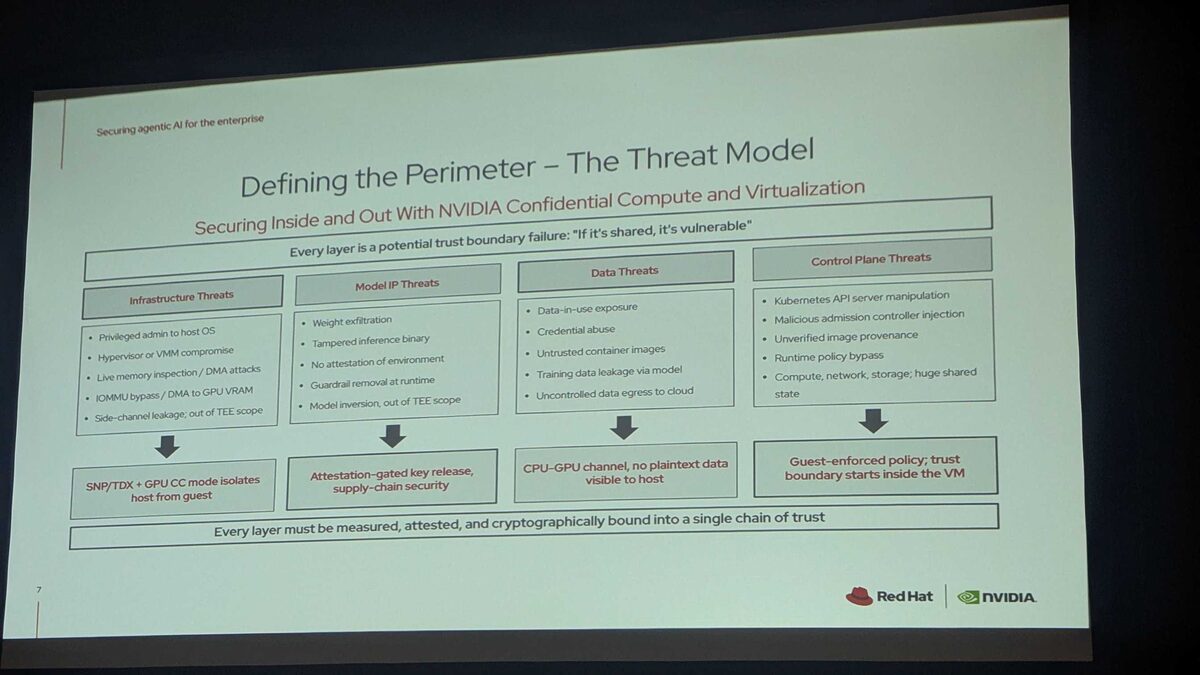
When your application processes data, it’s decrypted in RAM. A compromised hypervisor, a rogue cloud admin, or a memory-scraping attack can read it all. Confidential computing fixes this.
How It Works
Hardware-based Trusted Execution Environments (TEEs) encrypt data in memory. Even the cloud provider can’t see it:
Traditional VM:
  Cloud provider can access VM memory ← risk

Confidential VM:
  Hardware encrypts VM memory with keys the provider doesn't have
  Even with physical access to the server, data is encrypted
Technologies
AMD SEV-SNP:  Full VM encryption, no code changes needed
Intel TDX:    Similar to SEV-SNP, Intel ecosystem
Intel SGX:    Application-level enclaves (smaller TCB)
ARM CCA:      Confidential Compute Architecture (emerging)
NVIDIA H100:  Confidential GPU computing (AI workloads)
Confidential VMs on Cloud Providers
Azure (Most Mature)
# Create a confidential VM
az vm create \
  --name my-confidential-vm \
  --resource-group rg-confidential \
  --image Canonical:0001-com-ubuntu-confidential-vm-jammy:22_04-lts-cvm:latest \
  --size Standard_DC4as_v5 \
  --security-type ConfidentialVM \
  --os-disk-security-encryption-type VMGuestStateOnly \
  --enable-vtpm true \
  --enable-secure-boot true
GCP
gcloud compute instances create my-confidential-vm \
  --zone=europe-west4-a \
  --machine-type=n2d-standard-4 \
  --confidential-compute \
  --image-family=ubuntu-2204-lts \
  --image-project=ubuntu-os-cloud \
  --maintenance-policy=TERMINATE
AWS (Nitro Enclaves)
# Launch instance with enclave support
aws ec2 run-instances \
  --image-id ami-xxx \
  --instance-type m5.xlarge \
  --enclave-options 'Enabled=true'
Confidential Containers on Kubernetes
Run Kubernetes pods inside TEEs:
# Kata Containers with confidential computing
apiVersion: apps/v1
kind: Deployment
metadata:
  name: sensitive-api
spec:
  template:
    spec:
      runtimeClassName: kata-cc  # Confidential Containers runtime
      containers:
        - name: api
          image: registry.company.com/sensitive-api:v1
          resources:
            limits:
              cpu: "2"
              memory: 4Gi
The pod runs inside a hardware-encrypted TEE. Even the Kubernetes node operator can’t read the pod’s memory.
Use Cases
1. Multi-Party AI Training
Multiple hospitals want to train a shared AI model without sharing patient data:
Hospital A (encrypted enclave):
  Patient data → Local training → Encrypted gradients →
Hospital B (encrypted enclave):
  Patient data → Local training → Encrypted gradients →
                                                        ↓
                                              Aggregation (enclave)
                                              → Updated model
                                              (No party sees others' data)
2. Financial Data Processing
# Process sensitive financial data in an enclave
# The cloud provider never sees the plaintext data

@enclave_function
def calculate_risk_score(portfolio_data):
    """Runs inside TEE — data encrypted in memory."""
    positions = decrypt_in_enclave(portfolio_data)
    risk = monte_carlo_simulation(positions, iterations=10000)
    return encrypt_result(risk)
3. AI Inference on Sensitive Data
NVIDIA H100 supports confidential GPU computing:
Patient X-ray (encrypted) → Confidential GPU → Diagnosis (encrypted)
                              ↑
                     GPU memory is encrypted
                     Cloud provider can't see the X-ray
Attestation: Proving It’s Genuine
Remote attestation verifies that the TEE is genuine hardware, running expected code:
import hashlib
from azure.security.attestation import AttestationClient

def verify_enclave(attestation_token):
    """Verify the enclave is genuine before sending sensitive data."""
    client = AttestationClient(endpoint="https://shared-eu.attest.azure.net")

    result = client.attest_sgx_enclave(attestation_token)

    # Verify expected code is running
    expected_mrenclave = "a1b2c3..."
    assert result.enclave_held_data.mr_enclave == expected_mrenclave

    # Verify hardware is genuine
    assert result.is_debuggable == False
    assert result.product_id == EXPECTED_PRODUCT_ID

    return True
Deploying Confidential Computing with Ansible
- name: Deploy confidential computing infrastructure
  hosts: confidential_nodes
  tasks:
    - name: Verify hardware TEE support
      command: dmesg | grep -i sev
      register: tee_support
      failed_when: "'SEV' not in tee_support.stdout"

    - name: Install confidential containers runtime
      apt:
        name:
          - kata-containers
          - qemu-system-x86
        state: present

    - name: Configure Kubernetes RuntimeClass
      kubernetes.core.k8s:
        state: present
        definition:
          apiVersion: node.k8s.io/v1
          kind: RuntimeClass
          metadata:
            name: kata-cc
          handler: kata-cc
Automation patterns at Ansible Pilot. Kubernetes confidential container patterns at Kubernetes Recipes.
The Future
Confidential computing is moving from “niche security feature” to “default for sensitive workloads.” As regulation tightens (EU AI Act, GDPR, DORA), the ability to prove that data was never exposed — even to the cloud provider — becomes a competitive advantage.
If you process healthcare, financial, or personal data in the cloud, confidential computing should be on your 2026 roadmap.