The Problem
Claude Code is powerful out of the box, but every team has unique workflows. You might want to:
- Run the same code-review checklist on every pull request
- Generate product demo videos from HTML templates
- Audit Google and Meta ad accounts automatically
- Enforce a “write less code” policy across your engineering org
- Turn natural-language trading strategies into backtests
These are not features Claude Code ships with. They are extensions — and Claude Code’s extensibility layer (skills, plugins, and marketplaces) is what makes this possible without waiting for Anthropic to build it.
The Three Layers
Claude Code’s extensibility has three layers that build on each other:
| Layer | What it is | Distribution | Example |
|---|---|---|---|
| Skill | A single SKILL.md file with instructions | Personal, project, or plugin folder | Ponytail, summarize-changes |
| Plugin | A package of skills + agents + hooks + MCP | Via marketplace or direct repo | Claude Ads, Hyperframes |
| Marketplace | A catalog (marketplace.json) of plugins | Shared via git or URL | anthropics/skills, AgriciDaniel/claude-ads |
You can use just skills (no plugins at all). You can install plugins from other people’s marketplaces. You can build your own marketplace for your team. Each layer is optional, but together they turn Claude Code into a platform.
Layer 1: Skills — The SKILL.md File
What is a skill?
A skill is a directory containing a SKILL.md file. The file has two parts:
- YAML frontmatter — metadata that tells Claude when to use the skill
- Markdown instructions — the actual guidance Claude follows when the skill runs
---
description: Summarizes uncommitted changes and flags anything risky.
  Use when the user asks what changed, wants a commit message, or asks
  to review their diff.
---

## Current changes

!`git diff HEAD`

## Instructions

Summarize the changes above in two or three bullet points, then list any
risks you notice such as missing error handling, hardcoded values, or tests
that need updating.
The !`git diff HEAD` line uses dynamic context injection — Claude Code runs the command and replaces the line with its output before Claude reads the skill content. The instructions arrive with the current diff already inlined.
Where skills live
| Location | Path | Scope |
|---|---|---|
| Personal | ~/.claude/skills/<name>/SKILL.md | All projects on this machine |
| Project | .claude/skills/<name>/SKILL.md | This repository only (commit for team sharing) |
| Plugin | <plugin>/skills/<name>/SKILL.md | Wherever the plugin is enabled |
| Enterprise | Managed settings directory | All users on managed machines |
Personal skills travel with you. Project skills travel with the code. Plugin skills travel with the plugin.
Auto vs. manual invocation
Skills can be auto-invoked — Claude loads them when the description matches the user’s request — or manual — you type /skill-name to invoke them directly.
If a skill keeps firing when you don’t want it to, make the description more specific or add disable-model-invocation: true in the frontmatter to force manual-only.
Skills under the hood
Claude Code loads a listing of all available skill names and descriptions into context (sized to ~1% of the model’s context window). When that budget is exceeded, it shortens descriptions starting with your least-used skills. Run /doctor to check the listing’s context cost and find skills worth disabling.
Skills are based on the Agent Skills standard from agentskills.io — a cross-tool open standard. A SKILL.md written for Claude Code also works in Codex CLI, OpenCode, Cursor, and other compatible agents.
Layer 2: Plugins — Packaging Skills with Other Extensions
What is a plugin?
A plugin is a directory containing:
- A
.claude-plugin/plugin.jsonmanifest (name, version, description) - A
skills/folder with one or more SKILL.md files - Optionally: agents, hooks, MCP servers, LSP servers
Plugins bundle everything into a single distributable unit. When you install a plugin, you get all its skills, plus any agents and hooks it includes.
Installing a plugin
Two commands:
# 1. Add a marketplace (one-time)
/plugin marketplace add AgriciDaniel/claude-ads

# 2. Install a plugin from that marketplace
/plugin install claude-ads@AgriciDaniel
The first command registers a marketplace from a GitHub repository. The second installs a specific plugin from that marketplace. After installing, run /reload-plugins if Claude says to.
You can also install directly from a repo:
/plugin install user/repoWhat plugins can include
A plugin is not just skills. It can also package:
- Agents — specialized subagents with their own instructions and tools
- Hooks — commands that run before/after specific tool use (pre_tool_use, post_tool_use)
- MCP servers — Model Context Protocol servers that extend Claude’s tool set
- LSP servers — Language Server Protocol servers for language-aware autocomplete
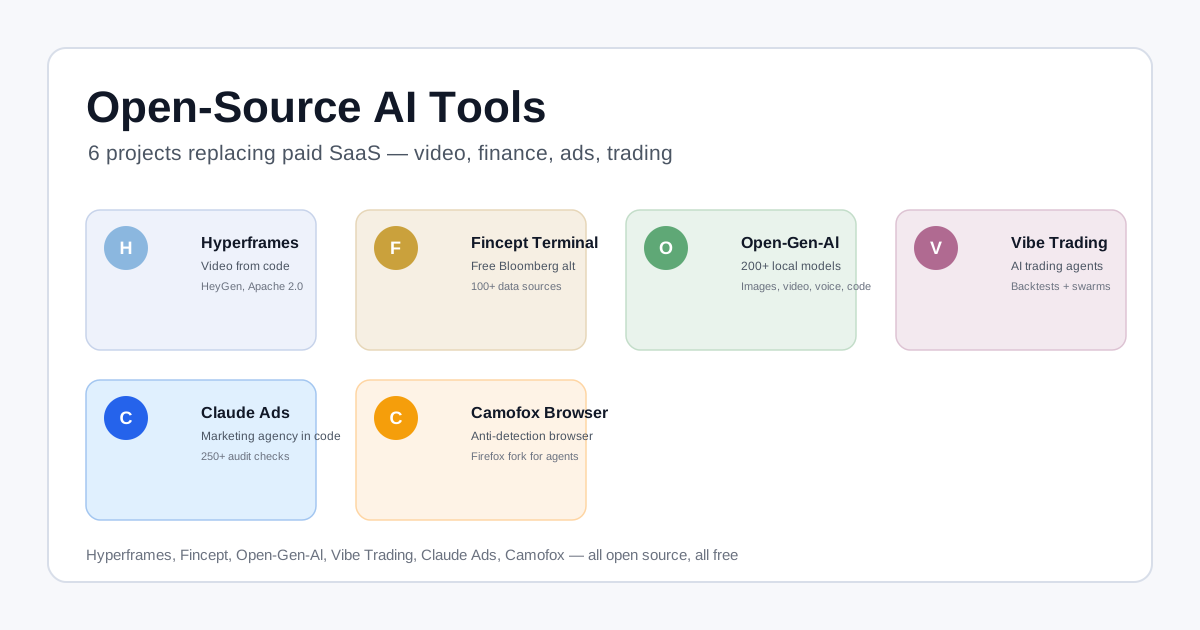
The Hyperframes plugin from HeyGen, for example, bundles video-rendering skills plus an MCP server that fetches brand data for video composition.
Plugin caching and isolation
When you install a plugin, Claude Code copies it to a cache directory (except for command source types in link mode, which are used in place). This means plugins can’t reference files outside their directory using relative paths like ../shared-utils. To share files across plugins, use symlinks or restructure the directory.
Layer 3: Marketplaces — Distributing to Teams
What is a marketplace?
A marketplace is a marketplace.json file in a .claude-plugin/ directory that lists plugins and where to find them. It’s a catalog — users add your marketplace with /plugin marketplace add <source>, then install individual plugins from it.
Creating a marketplace
The structure:
my-marketplace/
├── .claude-plugin/
│   ├── marketplace.json        # Catalog of plugins
│   └── plugin.json             # Marketplace manifest (optional)
├── plugins/
│   └── quality-review-plugin/
│       ├── .claude-plugin/plugin.json    # Plugin manifest
│       └── skills/quality-review/
│           └── SKILL.md                  # The skill
The marketplace.json:
{
  "name": "company-tools",
  "owner": { "name": "DevTools Team" },
  "plugins": [
    {
      "name": "code-formatter",
      "source": "./plugins/formatter",
      "description": "Automatic code formatting on save",
      "version": "2.1.0"
    },
    {
      "name": "deployment-tools",
      "source": { "source": "github", "repo": "company/deploy-plugin" },
      "description": "Deployment automation tools"
    }
  ]
}
Users add and install with:
/plugin marketplace add ./my-marketplace
/plugin install code-formatter@company-tools
Hosting and distribution
Marketplaces can be hosted on GitHub, GitLab, or any git host. For URL-based marketplaces (downloading just the JSON), plugin entries must use external sources (GitHub, git URL) — relative path sources won’t work because Claude Code only downloads the marketplace.json, not the referenced files.
For private marketplaces, set CLAUDE_CODE_PLUGIN_GIT_TIMEOUT_MS if your repos are large:
export CLAUDE_CODE_PLUGIN_GIT_TIMEOUT_MS=300000 # 5 minutesReal Examples: How Six Projects Use the System
Ponytail — Minimal Code Enforcement
Repo: DietrichGebert/ponytail (MIT, 132k stars)
Ponytail constrains Claude Code to write less code — the best code is the code you never wrote. It works as a plugin with a SessionStart hook that injects its ruleset automatically. Without a hook, Claude Code won’t self-activate the skill — you need the hook.
Install:
/plugin marketplace add DietrichGebert/ponytail
/plugin install ponytail@ponytail
A JetBrains benchmark found Ponytail reduces code by ~31% on larger builds. The skill is also available as a raw SKILL.md — you can install it without the plugin via git clone into your personal skills directory.
Hyperframes — Video from HTML
Repo: heygen-com/hyperframes (Apache 2.0, 47.5k stars)
Hyperframes turns HTML into MP4 video. It’s a plugin that includes a skill directory, an MCP server for brand data, and CLI tooling. Install with:
npx skills add heygen-com/hyperframesThen ask your agent:
Using /hyperframes, create a 20-second product demo video.Hyperframes is used in production at HeyGen, with adoption from tldraw and TanStack.
Claude Ads — Marketing Audits
Repo: AgriciDaniel/claude-ads (MIT)
Claude Ads is a plugin that packages 250+ ad-audit checks as skills, plus platform-specific subagents that run in parallel across 12 ad platforms. It includes a control plane, evidence tracking, and automated reporting.
Install:
/plugin marketplace add AgriciDaniel/claude-ads
/plugin install claude-ads@AgriciDaniel
The plugin structure includes:
ads/— main skill with interface metadataskills/— platform-specific lifecycle skillsagents/— subagents for parallel auditsclaude_ads_core/— typed contracts and scoring
Vibe Trading — Quant Research
Repo: HKUDS/Vibe-Trading (MIT)
Vibe Trading ships as a Python package (pip install vibe-trading-ai) with 64 finance skills and 29 swarm presets. Like Hyperframes, it uses the Agent Skills standard — a skills/ directory with SKILL.md files that load into Claude Code, Codex, OpenCode, and other compatible agents.
RTK — Token Compression
Repo: rtk-ai/rtk
RTK is a CLI proxy installed as a PreToolUse hook. It compresses terminal output before it reaches the model, reducing token consumption by 60–90%. It’s a plugin that works across Claude Code, Codex, and OpenCode via a shared hook system.
Install:
rtk init -gBuilding Your Own Skill: A Walkthrough
Step 1: Create the directory
mkdir -p ~/.claude/skills/my-skillStep 2: Write SKILL.md
---
description: Reviews Python code for common bugs and security issues.
  Use when the user asks for a code review.
---

## Instructions

Review the code I've selected or the files I've mentioned for:
- Security vulnerabilities (SQL injection, XSS, hardcoded secrets)
- Performance anti-patterns (N+1 queries, blocking I/O)
- Error handling gaps (swallowed exceptions, missing retries)
- Type safety issues (untyped function returns, Any types)

Be concise and actionable. Suggest specific fixes.
Step 3: Test it
Ask Claude Code: “Can you review this code for bugs?” — if the description matches, Claude auto-loads the skill. Or invoke directly:
/my-skillStep 4: Share it
To share with your team, commit the .claude/skills/ directory to your repo. Or package it as a plugin with a plugin.json manifest and distribute through a marketplace.
The Cross-Tool Standard
The Agent Skills standard (SKILL.md format with YAML frontmatter + markdown instructions) is not Claude Code-specific. It works across:
| Tool | Skill discovery path |
|---|---|
| Claude Code | ~/.claude/skills/, .claude/skills/ |
| Codex CLI | .codex/skills/, ~/.codex/skills/ |
| OpenCode | .openclaw/skills/, ~/.openclaw/skills/ |
| Cursor | .cursor/rules/ (different format, similar purpose) |
| Gemini CLI | .gemini/skills/ |
| Qoder | .qoder-plugin/plugin.json |
A skill written once can run in multiple agents. The frontmatter fields, description, and dynamic context injection (`!`command`) are part of the standard. Claude Code extensions (hooks, agents, subagent execution) are documented as non-standard.
Best Practices
For skill authors
- Put the key use case first in the
description— Claude Code uses it to decide when to auto-load the skill - Be specific — vague descriptions cause over-triggering
- Use dynamic context injection (
`!`command`) to pull live data into the skill - Keep skills focused — one skill, one job. Long reference material costs nothing until used
- Test auto-invocation — ask a question that should trigger your skill and verify it loads
For plugin authors
- Structure your repo with
.claude-plugin/plugin.jsonandskills/directory - Bump
versionon every release — users only get updates when the version changes - Use
commandsource types for plugins that need to run scripts in place - Handle the 120-second git timeout — set
CLAUDE_CODE_PLUGIN_GIT_TIMEOUT_MSfor large repos - Document installation with both
/plugin marketplace addand/plugin installcommands
For marketplace administrators
- Use a git-based marketplace if your plugins live in subdirectories (relative paths only work in git clones, not URL downloads)
- Bump plugin versions to trigger user updates
- Use the
renamesfield to migrate users when you rename or remove plugins - Avoid reserved marketplace names (
claude-code-marketplace,anthropic-marketplace, etc.)
The Big Picture
Skills and plugins solve the fundamental tension in AI coding assistants: you want the agent to be powerful and flexible, but you also want it to follow your team’s conventions, enforce your standards, and integrate with your tools.
Rather than building every possible workflow into the core product, Claude Code shipped an extensibility layer and let the community build the rest. The result is a marketplace of skills — from Ponytail’s YAGNI enforcement to Hyperframes’ video rendering to Claude Ads’ marketing audits — that turns a single coding agent into a platform.
Resources:
- Claude Code Skills documentation
- Agent Skills standard
- Plugin marketplace guide
- Ponytail on GitHub — 132k stars
- Hyperframes on GitHub — 47.5k stars
- Claude Ads on GitHub
Related Articles: