Running Buildbarn on Kubernetes gives Bazel a shared build cluster: a content-addressable store, an action cache, a scheduler and a pool of workers that run your build and test actions instead of your laptop or CI runner. In this tutorial I deploy the official bb-deployments Kubernetes manifests on a throwaway kind cluster, point a small Bazel project at it with --remote_executor, and watch Bazel remote execution work, fail and recover: actions running on Linux workers, cache hits after bazel clean, the platform mismatch you hit when the client is a Mac, and what changes when you scale the workers.
At the Uber x EngFlow Build Meetup in Amsterdam on 28 January 2026, Ed Schouten, introduced as the Buildbarn creator, opened his Bonanza talk with a “Typical Buildbarn based remote execution cluster” slide: Bazel and its output base at the desk, and bb-frontend, bb-storage, bb-scheduler, bb-worker and bb-portal in the cloud. In my bazel-remote cache post I only ran the cache half of that picture. This post builds the whole thing. Everything below is my own lab, not content from the talk.
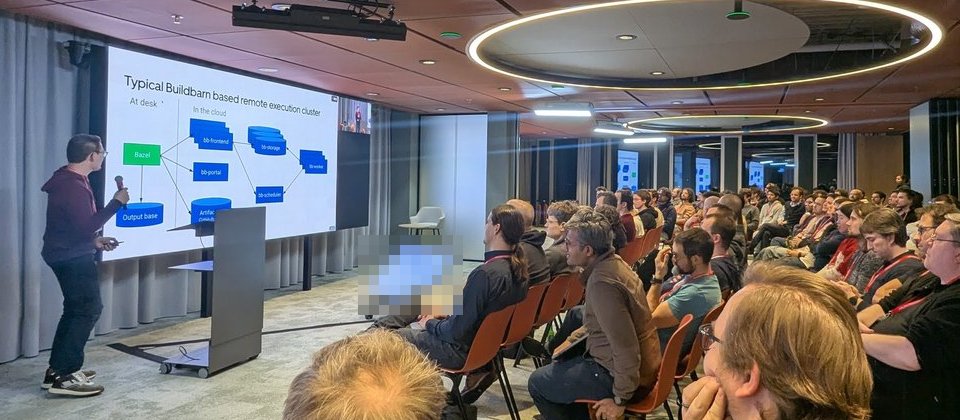
The slide from the meetup. Every box on the right becomes a Kubernetes workload below.
Versions. macOS on Apple silicon (8 cores), Docker 29.0.1 with 8 CPUs and 8 GB for the VM, kind v0.33.0 (node image Kubernetes v1.37.0, arm64), kubectl v1.37.1. bb-deployments at commit d4a6ca38 (changelog entry 2026-09-28), which pins bb-storage:20260906T092937Z-ae61334, bb-scheduler, bb-worker and bb-runner-installer:20260908T142432Z-77f7642, and bb-portal:20260921T081153Z-54e9f65. On the client: Bazel 9.2.0 through Bazelisk 1.29.0, rules_python 2.3.4, rules_shell 0.8.0, platforms 1.1.0 and the llvm module 0.8.24. I checked configuration fields against the .proto files of bb-storage at ae61334 and bb-remote-execution at 77f7642, the commits behind those images.
What runs where in the bb-deployments Kubernetes layout
The kubernetes/ directory of bb-deployments is one kustomization. A configMapGenerator turns the Jsonnet files in config/ into a ConfigMap called buildbarn-config, and every component reads its own file from it. Everything lives in the buildbarn namespace:
| Workload | Image | Port | Role |
|---|---|---|---|
frontend Deployment (3 replicas) | bb-storage | 8980 | The only endpoint Bazel talks to. Fans out CAS and AC requests to the shards, forwards Execute to the scheduler |
storage StatefulSet (2 replicas) | bb-storage | 8981 | Two shards, each holding CAS, AC and a file system access cache on PVCs |
scheduler-ubuntu22-04 Deployment | bb-scheduler | 8982, 8983, 8984, 7982 | Client gRPC, worker gRPC, build queue state, admin web page |
worker-ubuntu22-04 Deployment (8 replicas) | bb-worker + runner | none | Fetches inputs, asks the runner to execute, uploads outputs |
portal and postgres | bb-portal, postgres:18-alpine | 8081, 8082 | Web UI and Build Event Service |
Two details matter later. The worker pod has two containers. bb-worker runs from a minimal image without a shell. The runner container is the image your actions actually run in, ghcr.io/catthehacker/ubuntu:act-22.04 pinned by digest, and an init container copies the bb_runner binary into it from bb-runner-installer. The two talk over a UNIX socket at /worker/runner on a shared emptyDir.
If you have older notes that mention bb-browser: the bb-deployments changelog for 2026-07-03 says “Remove bb-browser from bb-deployments” and “Add bb-portal to bb-deployments”. bb-portal now covers the browser role.
Deploy Buildbarn on Kubernetes with kind and a kustomize overlay
Create the cluster. kind switches your current kubectl context to the new cluster, so I switched it straight back and passed --context on every command afterwards:
kind create cluster --name deepdive-buildbarn
kubectl config use-context minikube   # whatever you had before
git clone https://github.com/buildbarn/bb-deployments.git
The upstream manifests are sized for a real cluster: 8 workers, 3 frontends, 3 portal replicas and a 33 Gi CAS volume per storage shard, with a 32 GiB blocks file inside it. I didn’t edit them. A small overlay next to the clone changes the sizes:
# overlay/kustomization.yaml
apiVersion: kustomize.config.k8s.io/v1beta1
kind: Kustomization

resources:
  - ../bb-deployments/kubernetes

# Replace storage.jsonnet inside the generated ConfigMap.
configMapGenerator:
  - name: buildbarn-config
    namespace: buildbarn
    behavior: merge
    files:
      - storage.jsonnet

patches:
  - target: {kind: Deployment, name: frontend}
    patch: |-
      - op: replace
        path: /spec/replicas
        value: 1
  - target: {kind: Deployment, name: portal}
    patch: |-
      - op: replace
        path: /spec/replicas
        value: 1
  - target: {kind: Deployment, name: worker-ubuntu22-04}
    patch: |-
      - op: replace
        path: /spec/replicas
        value: 1
  - target: {kind: StatefulSet, name: storage}
    patch: |-
      - op: replace
        path: /spec/volumeClaimTemplates/0/spec/resources/requests/storage
        value: 5Gi
overlay/storage.jsonnet is a copy of the upstream file with two numbers changed: the CAS blocks file from 32 * 1024 * 1024 * 1024 to 4 * 1024 * 1024 * 1024 bytes, and the CAS key-location map from 400 MiB to 64 MiB. behavior: merge replaces that one key in the generated ConfigMap and keeps the others. kustomize also appends a content hash to the ConfigMap name, so changing the Jsonnet rolls the pods that mount it.
kubectl --context kind-deepdive-buildbarn apply -k overlay/
kubectl --context kind-deepdive-buildbarn -n buildbarn get pods
All images are multi-arch (linux/amd64 and linux/arm64/v8), so they ran natively on the arm64 kind node. Everything except the worker was Running within a minute. The worker took about five minutes, because the runner image is the big one (521 MB on the node), and then logged this for a few seconds:
Worker {"node":"deepdive-buildbarn-control-plane","pod":"worker-ubuntu22-04-...","thread":"6"}:
rpc error: code = Unavailable desc = Worker failed readiness check: connection error:
desc = "transport: Error while dialing: dial unix /worker/runner: connect: no such file or directory"
That’s the worker starting before the runner has created its socket. It stops on its own. The bb-deployments README describes the same race for docker-compose.
Port-forward the frontend and check the scheduler
The frontend Service is type: LoadBalancer, which stays <pending> on kind. A port-forward is enough for a lab:
kubectl --context kind-deepdive-buildbarn -n buildbarn port-forward svc/frontend 8980:8980 &
kubectl --context kind-deepdive-buildbarn -n buildbarn port-forward svc/scheduler 7982:7982 &
http://localhost:7982/ is the scheduler’s admin page. With one worker pod it showed one platform queue: instance name prefix "", properties OSFamily="linux" and container-image="docker://ghcr.io/catthehacker/ubuntu:act-22.04@sha256:dd76…", and 8 workers. Why 8 for one pod? worker-ubuntu22-04.jsonnet sets concurrency: 8 on the runner, and each slot registers as a worker with a thread label. That platform block is the contract Bazel has to match.
Point Bazel at Buildbarn with —remote_executor
The demo project is the rules_python workspace from my multiple Python versions post, plus a gen package with 32 genrules that each sleep 2, one bundle genrule that concatenates them, a whereami genrule that writes uname -sm and /etc/os-release into its output, and an sh_test that checks the bundle.
First attempt, with only the endpoint:
$ bazel build --remote_executor=grpc://localhost:8980 //gen:whereami
ERROR: .../gen/BUILD.bazel:22:8: Executing genrule //gen:whereami failed: (Exit 34):
UNAVAILABLE: No workers exist for instance name prefix "" platform {}
Bazel sent an action with an empty platform, and the scheduler has no queue for {}. The scheduler returns UNAVAILABLE, a retryable error, only during the first platformQueueWithNoWorkersTimeout after it starts (900 s in this config) to give workers time to connect. After that the same mismatch is FAILED_PRECONDITION. Either way, the properties must match a worker exactly. The scheduler config uses platformKeyExtractor: { action: {} }, which reads them from the REv2 Action message.
So the .bazelrc gets the same two properties the worker advertises:
build:bb --remote_executor=grpc://localhost:8980
build:bb --remote_timeout=120s
build:bb --jobs=64
build:bb --remote_default_exec_properties=OSFamily=linux
build:bb --remote_default_exec_properties=container-image=docker://ghcr.io/catthehacker/ubuntu:act-22.04@sha256:dd7654ffb01d5b7b54b23b9ce928a1f7f2d08c7b3d7e320b6574b55d7ccde78b
--remote_default_exec_properties applies only “if an execution platform does not already set exec_properties” (Bazel’s flag help). --jobs=64 lets Bazel keep more actions in flight than the laptop has cores, which is the point of a remote pool. The grpc:// scheme matters: without it Bazel assumes grpcs and tries TLS. Note that container-image is only a label the scheduler matches on. Buildbarn doesn’t pull it. The runner container in the worker pod decides what actions run in, and the bb-deployments README warns that the image name and digest are configured in several places that must agree.
$ bazel build --config=bb //gen:whereami
INFO: 2 processes: 1 internal, 1 remote.
$ cat bazel-bin/gen/whereami.txt
Linux aarch64
PRETTY_NAME="Ubuntu 22.04.5 LTS"
1 remote is the action that ran on a worker. A Mac client, an Ubuntu 22.04 runner container, and aarch64 because kind on Apple silicon runs arm64 nodes.
Pitfall: inputs on the worker are read-only
The 32 genrules worked locally and failed remotely:
ERROR: .../gen/BUILD.bazel:5:12: Executing genrule //gen:step_12 failed: (Exit 1): bash failed
Remote server execution message: Action details (uncached result): http://bb-portal.example.com:80/browser/blobs/sha256/historical_execute_response/bd31d6ab...-994/
/bin/bash: line 1: bazel-out/darwin_arm64-fastbuild/bin/gen/step_12.txt: Permission denied
The command was sleep 2 && cp $< $@ && echo step N >> $@. A debug genrule that ran ls -l on its input showed why:
-r-xr-xr-x 2 root root 30 Jan 1 2000 tmpdbg/input.txtWith the native build directory, bb_worker hard-links inputs from its local cache (2 links), read-only and owned by root, while the runner runs as UID 65534. cp copies the source’s permission bits to the new file, so the output was created read-only and the append failed. On my Mac the source file was writable, so the bug never showed. The fix is cat $< > $@. Remote execution finds undeclared assumptions like this one.
Also note the browserUrl in that message: http://bb-portal.example.com:80/browser, from common.libsonnet. Set it to your real portal address so these links work.
Bazel remote execution and cache hits
After the fix, a cold run of the gen package with one worker pod:
$ bazel test --config=bb //gen:all
INFO: Elapsed time: 9.204s, Critical Path: 8.92s
INFO: 41 processes: 1 remote cache hit, 6 internal, 35 remote.
//gen:bundle_test                                                PASSED in 0.1s
The test log said kernel: Linux aarch64, steps: 32. The one cache hit was whereami from the earlier build. 32 sleeps of 2 seconds on 8 slots is 8 seconds, which matches the critical path. Then bazel clean and the same command, twice:
INFO: Elapsed time: 3.033s, Critical Path: 0.27s
INFO: 41 processes: 36 remote cache hit, 6 internal.
INFO: Elapsed time: 2.415s, Critical Path: 0.98s
INFO: 41 processes: 36 remote cache hit, 6 internal.
//gen:bundle_test                                       (cached) PASSED in 0.1s
I never set --remote_cache. The frontend serves the action cache and CAS on the same endpoint, and Bazel looked up each action there before sending it to the scheduler. The cache-key rules from the bazel-remote post apply unchanged: --action_env, a leaky PATH or stamping change the action digest, and a different digest means the action runs again.
Why the execution platform must match the worker
The genrules got away with it because bash, cat and sleep exist on both macOS and Ubuntu. A py_test with a hermetic interpreter doesn’t:
$ bazel test --config=bb //app:versioninfo_test_3_12
//app:versioninfo_test_3_12                                      FAILED in 0.3s
OSError: [Errno 8] Exec format error: '/worker/build/b68ed61521bb3e4e/root/bazel-out/darwin_arm64-fastbuild/bin/app/versioninfo_test_3_12.runfiles/_main/app/_versioninfo_test_3_12.venv/bin/python3'
Bazel still thought it was building for and executing on the Mac, so rules_python selected the macOS interpreter, shipped it to a Linux worker, and the kernel refused to run it. The properties told the scheduler where to run the action. Nothing told Bazel. That’s what a platform is for:
# platforms/BUILD.bazel
platform(
    name = "buildbarn_linux_arm64",
    constraint_values = [
        "@platforms//os:linux",
        "@platforms//cpu:aarch64",
    ],
    exec_properties = {
        "OSFamily": "linux",
        "container-image": "docker://ghcr.io/catthehacker/ubuntu:act-22.04@sha256:dd7654ffb01d5b7b54b23b9ce928a1f7f2d08c7b3d7e320b6574b55d7ccde78b",
    },
)
build:bb-linux --config=bb
build:bb-linux --extra_execution_platforms=//platforms:buildbarn_linux_arm64
build:bb-linux --platforms=//platforms:buildbarn_linux_arm64constraint_values drive toolchain resolution. exec_properties go to the scheduler. --extra_execution_platforms is considered before other registered platforms, and --platforms makes the tests target Linux too, since a test runs what it built. Use @platforms//cpu:x86_64 for amd64 workers. The tools/platforms package in bb-deployments declares x86_64, which doesn’t describe these arm64 kind nodes, so don’t copy it blindly.
Two more errors followed, both from host-only defaults:
No matching wheel for current configuration's Python version and platform.rules_python’spip.parseonly evaluates requirements for the host whentarget_platformsis empty. The fix istarget_platforms = ["{os}_{arch}", "linux_aarch64"]on eachpip.parse.While resolving toolchains for target @@bazel_tools//third_party/ijar:zipper: No matching toolchains found for types: @@bazel_tools//tools/cpp:toolchain_type. rules_python’s executables have a_zipperattribute withcfg = "exec". In@bazel_tools//tools/zip, the zipper is a prebuilt file only when the exec platform matches the host. Otherwise it’s built from C++ sources, so analysis needs a C++ toolchain for Linux arm64 even though the zipper never ran in my build.
For the second one I used what bb-deployments uses: the hermetic llvm module, limited to the one exec and target pair I need:
bazel_dep(name = "llvm", version = "0.8.24")

toolchain = use_extension("@llvm//extensions:toolchain.bzl", "toolchain")
toolchain.exec(arch = "aarch64", os = "linux")
toolchain.target(arch = "aarch64", os = "linux")
use_repo(toolchain, "llvm_toolchains")

register_toolchains("@llvm_toolchains//:all")
Then everything passed:
$ bazel test --config=bb-linux //...
INFO: Elapsed time: 301.927s, Critical Path: 257.10s
//app:versioninfo_test_3_12                                       PASSED in 138.0s
//app:versioninfo_test_3_13                                       PASSED in 2.4s
//app:versioninfo_test_default                                    PASSED in 138.2s
//gen:bundle_test                                       (cached) PASSED in 0.1s
The 3.13 test printed 'python': '3.13.13' with a base_prefix under rules_python++python+python_3_13_aarch64-unknown-linux-gnu, the Linux interpreter. The first run included fetching the Linux interpreters and toolchain repositories, and two tests reported 138 seconds on a cold worker. Re-running them with --nocache_test_results, so they executed again on the same, now warm worker, took 4.0 s each. After bazel clean, the whole suite took 9.2 s with 45 remote cache hit. The 34 genrules hit the cache even though they now ran under the new platform: the platform’s exec_properties were identical to the defaults, so the Action messages and their digests didn’t change.
One cosmetic thing: paths still say darwin_arm64-fastbuild. The output directory name comes from --cpu, which defaults to the host and doesn’t follow --platforms. The hermetic-llvm README documents --experimental_platform_in_output_dir for host-independent paths, which also matters if Mac and Linux clients should share cache hits on actions that embed paths.
Scale the Buildbarn workers
Workers are a Deployment, so scaling is one command. I changed gen/input.txt before each run so all 33 genrules missed the cache:
kubectl --context kind-deepdive-buildbarn -n buildbarn \
scale deployment worker-ubuntu22-04 --replicas=4| Worker pods | Slots (pods x 8) | Elapsed | Critical path | Processes |
|---|---|---|---|---|
| 1 | 8 | 11.468 s | 10.29 s | 33 remote |
| 4 | 32 | 4.884 s and 3.904 s | 3.51 s and 3.19 s | 33 remote |
The scheduler page went from 8 to 32 workers on the same platform queue a few seconds after the new pods started. On a laptop all four pods share the same 8 cores, so this only shows the sleeps running in parallel. On a real cluster, slots should map to real CPUs, which brings us to operations.
Sizing and operating Buildbarn on Kubernetes (from the docs, untested)
None of this section ran in my lab. It comes from the bb-deployments Kubernetes README and the configuration .proto files at the commits above.
Storage sizing. LocalBlobAccess splits the blocks file into spare_blocks + old_blocks + current_blocks + new_blocks blocks; the upstream config has 3 + 8 + 24 + 3 for the CAS. A blob can’t span blocks, so the block size caps the largest object. With my 4 GiB file that’s about 108 MiB, a limit to check if you store large artifacts. Garbage collection discards one block at a time, and data read from “old” blocks is copied forward, so it behaves roughly like LRU. The key-location map is a hash table, with recommended size “between 2 and 10 times the expected number of objects” for the in-memory variant. The protos name two Prometheus signals: buildbarn_blobstore_hashing_key_location_map_put_too_many_iterations_total above zero means the map is too small, and time() - buildbarn_blobstore_old_current_new_location_blob_map_last_removed_old_block_insertion_time_seconds is your worst-case retention. Both reset when bb_storage restarts.
Sharding. Every component that reads storage (frontend, scheduler, workers) picks a shard with rendezvous hashing on the digest, the shard’s key and its weight. Removing a shard only moves the blobs that lived on it, and adding one moves roughly weight / total_weight of the keys. That’s why the shards are a StatefulSet with stable DNS names (storage-0.storage.buildbarn). For redundancy, mirrored pairs two backends with replicators. The action cache sits behind completenessChecking, which only returns results whose output files are all present in the CAS; the proto notes that Bazel requires this.
Workers. The README advises fixed CPU requests and limits for bb_runner, plus the kubelet’s static CPU management policy. Otherwise, tools that size thread pools from the CPU count see every core on the node. With cgroup v2, a container hitting its memory limit has all its processes OOM-killed, runner included. Kubernetes 1.32 and later can restore the old behaviour with the kubelet’s singleProcessOOMKill option. The worker’s local file cache here is 1 GiB (maximumCacheSizeBytes) on an emptyDir, so every new pod starts with a cold cache. That’s consistent with my first 138-second test runs and the 4-second reruns.
Authentication. Every config in this lab uses authenticationPolicy: { allow: {} } and allow authorizers. That’s fine behind a port-forward, not on a network. bb-storage’s AuthenticationPolicy supports tls_client_certificate, jwt and remote policies, combined with any and all. The per-operation authorizers (getAuthorizer, putAuthorizer, executeAuthorizer) accept instance_name_prefix and JMESPath expressions. A good first rule is that only CI may write to the action cache. The frontend and portal-bes Services are LoadBalancer type, so check what they expose before you apply the manifests to a cloud cluster.
Clean up
kind delete cluster --name deepdive-buildbarn
bazel clean --expunge
The images were pulled inside the kind node, so deleting the cluster removes them too.
My take
The manifests deploy cleanly. The harder part is the client. Buildbarn showed me three kinds of host assumptions in a 40-line demo: a writable input, host-only wheels, and a toolchain that only existed for macOS. The platform definition belongs in the repository, next to the worker image digest, and should be updated in the same change. Before you size storage, run the cache-only setup from the bazel-remote post, make your build hermetic, and only then add workers. When something does fail remotely, the tools in my Bazel debugging post (the execution log, --toolchain_resolution_debug, the Build Event Protocol) work the same against a cluster.