A Bazel remote cache lets every laptop and CI runner reuse the outputs of actions that someone else already ran. In this tutorial I run bazel-remote from its release binary, point Bazel at it over gRPC, and measure a cold and a warm build after bazel clean. Then I show the misses I hit (an --action_env variable, a leaking PATH, a stamped action), how I found them in the execution log, read-only CI clients, auth options, and where Buildbarn and EngFlow come in.
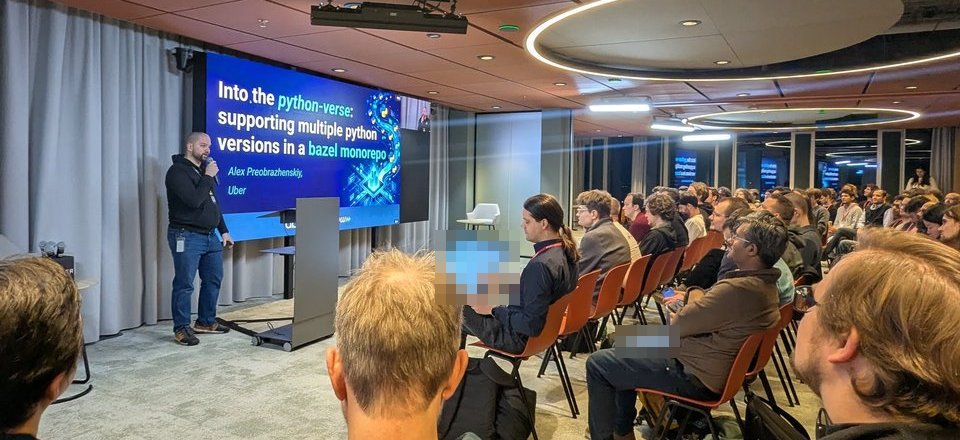
At the Uber x EngFlow Build Meetup in Amsterdam on 28 January 2026, remote execution and caching ran through the evening. EngFlow’s opening slide listed “Remote Execution and Caching”, the agenda included a talk called “The many caches of Bazel” from EngFlow, and Ed Schouten started his Bonanza talk with a “Typical Buildbarn based remote execution cluster” slide, with bb-storage holding the cache in the cloud and Bazel at the desk. I have no photos of the caches talk, so nothing below comes from it: this is my own lab, built from the Bazel and bazel-remote docs.
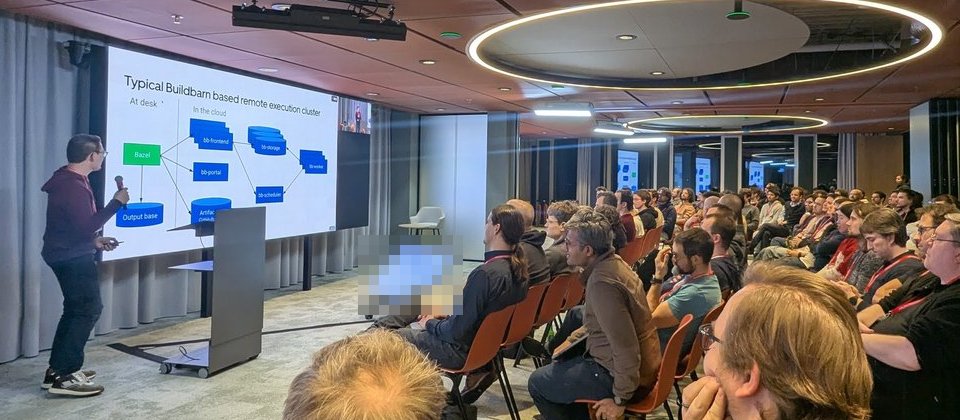
The Buildbarn cluster slide from the Build Meetup Amsterdam. A single bazel-remote process plays the storage role on its own.
Versions. Everything below ran on macOS (Apple silicon, 8 cores) with Bazel 9.2.0 started through Bazelisk 1.29.0, and bazel-remote v2.6.2 (released 23 July 2026, darwin-arm64 binary). I checked the bazel-remote flags against its --help and README at v2.6.2, and the Bazel flags against bazel help build --long. The demo is the small rules_python project from my Bazel multiple Python versions post, plus a gen package with 32 genrules.
How a Bazel remote cache works: action cache and CAS
Bazel splits a build into actions. Each action has inputs, a command line, environment variables and declared outputs. The remote caching docs describe two stores:
- The action cache (AC): “a map of action hashes to action result metadata”. The key is the digest of the action. The value is an
ActionResult: exit code, output file names and their content digests, and stdout and stderr digests. - The content-addressable store (CAS): the output files themselves, keyed by the SHA-256 of their content.
In the Remote Execution API, the Action message holds a command_digest, an input_root_digest, a timeout and the platform, and the Command holds the arguments and environment_variables. So the AC key changes if any input byte, argument or environment variable changes. Every pitfall below comes down to that. On a hit, Bazel gets the ActionResult and fetches blobs from the CAS as needed. On a miss, it runs the action locally and, by default, uploads the result.
Run bazel-remote locally from the release binary
bazel-remote is a single Go binary. Two flags are required: --dir and --max_size, which is in GiB.
VERSION=2.6.2
curl -fsSL -o bazel-remote \
  "https://github.com/buchgr/bazel-remote/releases/download/v${VERSION}/bazel-remote-${VERSION}-darwin-arm64"
chmod +x bazel-remote

./bazel-remote \
  --dir "$HOME/bazel-remote-data" \
  --max_size 1 \
  --http_address 127.0.0.1:8080 \
  --grpc_address 127.0.0.1:9092
--max_size 1caps the disk cache at 1 GiB. bazel-remote evicts least recently used entries above that. The startup log printedWill evict at max size: 1.00 GB.--http_addressand--grpc_addressreplace the deprecated--host,--portand--grpc_portflags in 2.6.2. I bound both to127.0.0.1because this cache has no authentication.- The startup log also showed
Storage mode: zstd(the default--storage_mode) andgRPC AC dependency checks: enabled: for gRPCGetActionResultcalls, bazel-remote checks the referenced blobs, unless you pass--disable_grpc_ac_deps_check.
Check it is up with the two endpoints the README documents:
curl -s http://127.0.0.1:8080/status
curl --head --fail \
  http://127.0.0.1:8080/cas/e3b0c44298fc1c149afbf4c8996fb92427ae41e4649b934ca495991b7852b855
The second URL is the SHA-256 of the empty blob, which bazel-remote always serves. On the empty cache, /status returned "NumFiles": 0 and "MaxSize": 1073741824. On disk the cache directory holds ac.v2, cas.v2 and raw.v2 subdirectories.
Point Bazel at it with —remote_cache
Put the settings in the project’s .bazelrc under named configs, so a plain bazel build stays local:
# Remote cache: bazel-remote's gRPC port on this machine.
build:cache --remote_cache=grpc://127.0.0.1:9092
build:cache --remote_timeout=60s

# CI readers: use the cache, never write to it.
build:ci-read --config=cache
build:ci-read --remote_upload_local_results=false
The scheme matters. The --remote_cache help in Bazel 9.2 says “If no schema is provided Bazel will default to grpcs”, so 127.0.0.1:9092 without grpc:// would try TLS and fail against this server. Bazel also accepts http://, https://, grpcs:// and unix: URLs. --remote_upload_local_results defaults to true, so the cache config both reads and writes.
Cold vs warm: measuring remote cache hits
The test is the one the debugging guide recommends: populate the cache, run bazel clean so local results can’t mask anything, then run the same command again.
bazel clean
bazel test --config=cache //... --execution_log_compact_file=/tmp/exec-cold.log
bazel clean
bazel test --config=cache //... --execution_log_compact_file=/tmp/exec-warm.log
The gen package has 32 independent genrules that each run sleep 2 (a stand-in for a slow compiler, not real work) plus one that concatenates their outputs, and the app package has three py_test targets. With 8 cores, the sleeps alone take about 8 seconds. These are the INFO lines Bazel printed:
# cold, empty cache
INFO: Elapsed time: 11.713s, Critical Path: 2.87s
INFO: 71 processes: 31 internal, 43 darwin-sandbox.

# warm, after bazel clean
INFO: Elapsed time: 2.134s, Critical Path: 0.39s
INFO: 71 processes: 42 remote cache hit, 31 internal, 1 darwin-sandbox.
//app:versioninfo_test_3_12        (cached) PASSED in 2.2s
I repeated it against a second, empty bazel-remote instance:
| Run | Elapsed | Critical path | Processes |
|---|---|---|---|
| Cold, cache A | 11.713 s | 2.87 s | 43 darwin-sandbox |
| Warm, cache A | 2.134 s and 2.388 s | 0.39 s and 0.48 s | 42 remote cache hit, 1 darwin-sandbox |
| Cold, cache B | 9.944 s | 2.24 s | 43 darwin-sandbox |
| Warm, cache B | 1.595 s and 1.464 s | 0.39 s and 0.50 s | 42 remote cache hit, 1 darwin-sandbox |
These are timings for a toy build on one laptop, so read the ratio, not the absolute numbers. On the warm runs Bazel loaded and analysed the packages again, because bazel clean discards that state too, so the remaining time is mostly analysis, not actions. Test results come from the cache as well: the tests show (cached) PASSED with the duration of the original run.
Three ways to see the hits:
- The processes line.
remote cache hitcounts cached actions,darwin-sandbox(orlinux-sandbox) counts local runs, andinternalcan be ignored. Local cache hits aren’t counted, hence thebazel clean. - bazel-remote’s
/status. After the first cold run it reported"NumFiles": 173and"CurrSize": 708608. The default access log shows each request:GRPC AC GET ... NOT FOUNDon a miss,GRPC AC PUT ... OKon an upload. - The execution log. The docs recommend
--execution_log_compact_file, but reading it means building//src/tools/execlog:parserfrom the Bazel source. For a small build,--execution_log_json_fileis easier: each record hastargetLabel,runner(for example"remote cache hit"),digest(the action digest, which is the AC key),environmentVariablesand theinputswith their digests.
One action missed on every warm run. Finding out why was the first pitfall.
The cache-key pitfalls I hit
Stamping
The missing action was a genrule with stamp = 1 that reads bazel-out/volatile-status.txt. In the JSON log, that file’s digest was different on every run, because Bazel always writes BUILD_TIMESTAMP into it. The user manual says Bazel “pretends that the volatile file never changes”, but that only protects the local incremental state. A remote cache lookup hashes the real file, so a stamped action that reads it misses every time. The stable file isn’t safe across machines either: Bazel always writes BUILD_HOST and BUILD_USER into stable-status.txt.
The fix: leave --stamp off (it’s off by default) for CI and developer builds, enable it only for release builds, and keep stamped targets near the top of the graph so few actions depend on them.
—action_env leaks the client environment
--action_env=NAME copies NAME from your shell into every action’s environment, and so into every action key. I built //gen:bundle three times after bazel clean, with TEAM=alice, TEAM=bob, then TEAM=alice again, each with --action_env=TEAM:
TEAM=alice  34 processes: 1 internal, 33 darwin-sandbox.
TEAM=bob    34 processes: 1 internal, 33 darwin-sandbox.
TEAM=alice  34 processes: 33 remote cache hit, 1 internal.
Same sources, same command, one different variable, and 33 misses. If a value has to reach an action, set it with --action_env=NAME=value in a checked-in .bazelrc, so everyone gets the same key.
PATH and different host paths
Bazel 9 defaults to --incompatible_strict_action_env=true, so actions get a fixed PATH. My exec log showed /bin:/usr/bin:/usr/local/bin. If you turn it off, or pass --action_env=PATH, the client PATH goes into every key. I simulated two users with PATH=/Users/alice/.local/bin:/usr/bin:/bin and PATH=/Users/bob/.local/bin:/usr/bin:/bin and --noincompatible_strict_action_env: both builds missed all 33 actions, and the same genrule had two different action digests.
The log also showed something I didn’t expect. The leaked PATH started with Bazelisk’s download directory, ending in bazelisk/downloads/sha256/<hash>/bin. The Bazelisk README documents this: it “prepends a directory to PATH that contains the downloaded Bazel binary”. So with a leaky PATH, two people with different home directories or BAZELISK_HOME settings never share hits, even with identical shells otherwise. The known issues section also says to check for an old /etc/bazel.bazelrc: Bazel’s Debian and Ubuntu package used to install one that passed PATH through --action_env.
The opposite problem is worse. Bazel doesn’t track tools outside the workspace, so two machines with different /usr/bin compilers can produce the same action key and wrongly share hits. Hermetic toolchains, like the rules_python interpreters in this demo, avoid that.
—disk_cache vs the remote cache
--disk_cache=PATH uses a local directory as a cache, with its own ac and cas subdirectories. It survives bazel clean and is shared between checkouts on one machine, but not between machines. I combined both flags, then ran again after bazel clean:
run 1  34 processes: 1 internal, 33 darwin-sandbox.
run 2  34 processes: 33 disk cache hit, 1 internal.
The disk cache answered first, labelled disk cache hit. It’s a good default for laptops (Bazel 7.4+ can garbage collect it with --experimental_disk_cache_gc_max_size and --experimental_disk_cache_gc_max_age), but ephemeral CI runners start with an empty disk, so they need the remote cache.
One more flag to know: --remote_download_outputs defaults to toplevel in Bazel 9.2. After a warm build of //gen:bundle, bazel-bin/gen held only bundle.txt. With --remote_download_outputs=all it held all 33 files. If a script reads intermediate outputs from bazel-bin, set all for that job.
Read-only CI clients vs writers
The docs advise: “Take care in who has the ability to write to the remote cache. You may want only your CI system to be able to write to the remote cache.” A poisoned entry is served to everyone until you delete it. I changed an input, then ran the ci-read config twice, the cache config once, and ci-read again, with bazel clean before each:
| Config | Processes | bazel-remote NumFiles |
|---|---|---|
| ci-read | 33 darwin-sandbox | 575 (unchanged) |
| ci-read | 33 darwin-sandbox | 575 (unchanged) |
| cache (writer) | 33 darwin-sandbox | 674 |
| ci-read | 33 remote cache hit | 674 |
A reader never fills the cache, so the second reader paid full price too. My recommendation is one trusted writer job on the main branch, and readers everywhere else (pull requests from forks, developer laptops). --remote_upload_local_results=false is a client setting, though, and anyone can change it, so enforce the split on the server as well (next section). Targets that should never be cached can be tagged no-remote-cache.
Authentication and TLS (from the docs, not tested)
I didn’t test any of this; it comes from bazel-remote’s --help and README for v2.6.2 and Bazel 9.2’s flag help.
- Server TLS:
--tls_cert_fileand--tls_key_file, plus--min_tls_version, which defaults to1.0, so raise it. - Client certificates (mTLS): add
--tls_ca_file. On the Bazel side use agrpcs://URL with--tls_certificate,--tls_client_certificateand--tls_client_key. - Basic auth:
--htpasswd_fileon the server, credentials in the URL on the client (https://user:pass@host:port), kept in a user-specific, git-ignored bazelrc. The README recommends TLS so passwords aren’t sent in plain text. - Readers without credentials:
--allow_unauthenticated_readslets unauthenticated clients read while writes still need credentials. This is the server-side version of the read-only CI split. - Other options: LDAP is experimental, and “only one authentication mechanism can be used at a time”. On the Bazel side,
--remote_headerand--credential_helpercover token-based setups.
Where Buildbarn and EngFlow fit
bazel-remote implements the ActionCache, ContentAddressableStorage and Capabilities services of the Remote Execution API v2, plus the ByteStream API. It doesn’t implement Execution. Your machine still runs every action that misses. It can also act as a proxy in front of S3, GCS, Azure Blob or another HTTP or gRPC cache.
A remote execution server implements the whole API. In the Buildbarn diagram from the meetup, bb-storage holds the CAS and action cache, and bb-scheduler and bb-worker run the actions. EngFlow presented itself at the meetup as offering “Remote Execution and Caching”. With remote execution, Bazel sends the action digest, the server checks its own action cache, and on a miss a worker runs the action. The processes line shows remote instead of darwin-sandbox. The cache-key rules don’t change: the same --action_env and stamping mistakes cause misses on a remote execution cluster too, because the protocol uses the same action digest.
My take
Start with bazel-remote and one writer job. It’s a binary and a directory, and the execution log will show you how hermetic your build really is before you pay for a cluster. Make “no unexpected misses after bazel clean” a CI check on a known target, and keep --action_env and --stamp in code review. Move to Buildbarn or a managed service like EngFlow when the misses are real work your runners can’t keep up with, not before.