On Thursday 15 January 2026 I went to “Applied AI: Navigating Legacy Systems and Building Agentic Workflows”, an evening of the AI Native Netherlands meetup group, hosted at the Elastic office on Keizersgracht 281 in Amsterdam. The slides never named the group. I matched my photos to the Meetup listing: same date, same venue, and the same two talks in the same order. The group describes itself as a technical community exploring the shift from cloud native to AI native.
There were two talks. ANWB went first, on forecasting how much roadside help will be needed. Elastic went second, on building agents on top of Elasticsearch, with a long live demo.
How AI is helping you back on the road (ANWB)
According to the Meetup listing, the first talk was “How AI is helping you back on the road” by Yke Rusticus and David Brummer of ANWB, the Dutch motoring club. The abstract set the tone: “We learn at school what AI can do when the data is perfect.” This talk was about what AI can do when neither the data nor the environment is perfect. I only took two photos during this talk, so this section is short.
The first slide I photographed showed the operating model, titled “Sending the right help: Planners decide on distribution of technicians”. It drew the chain from a car in trouble through intake, classification / triage and regression + optimisation / dispatch to roadside assistance. A second branch, forecasting / planning, fed a map of where the patrol vans should be. A note on the slide named the models: XGBoost + Prophet to predict number of car trouble cases. A legend marked which steps are automated “with data & AI”.
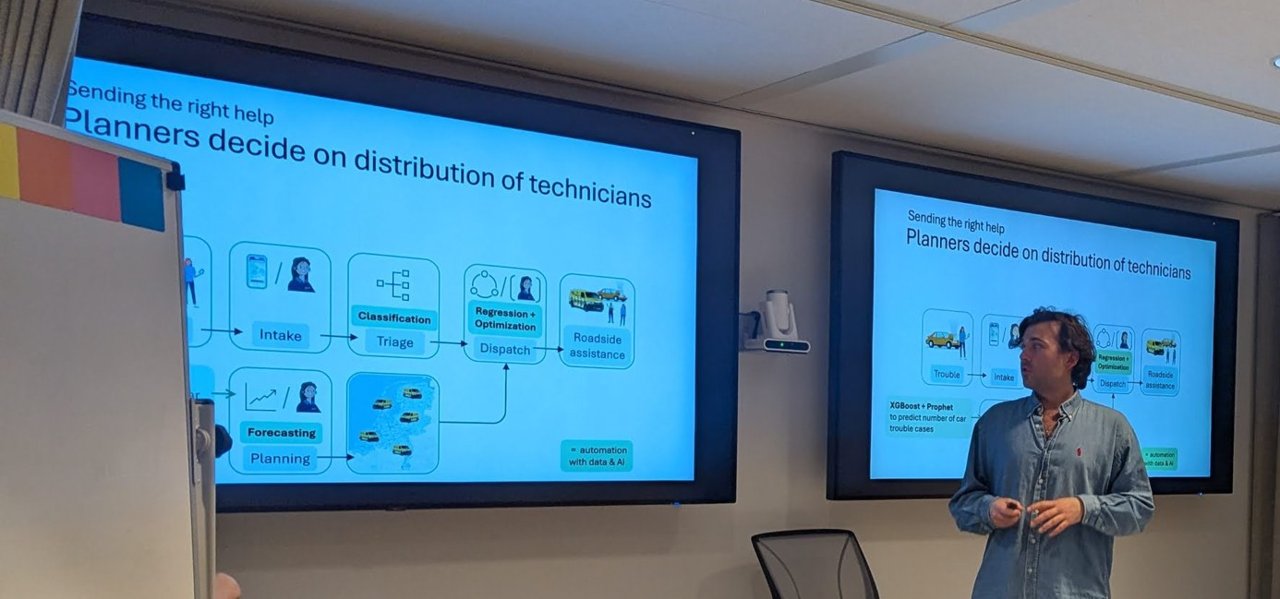
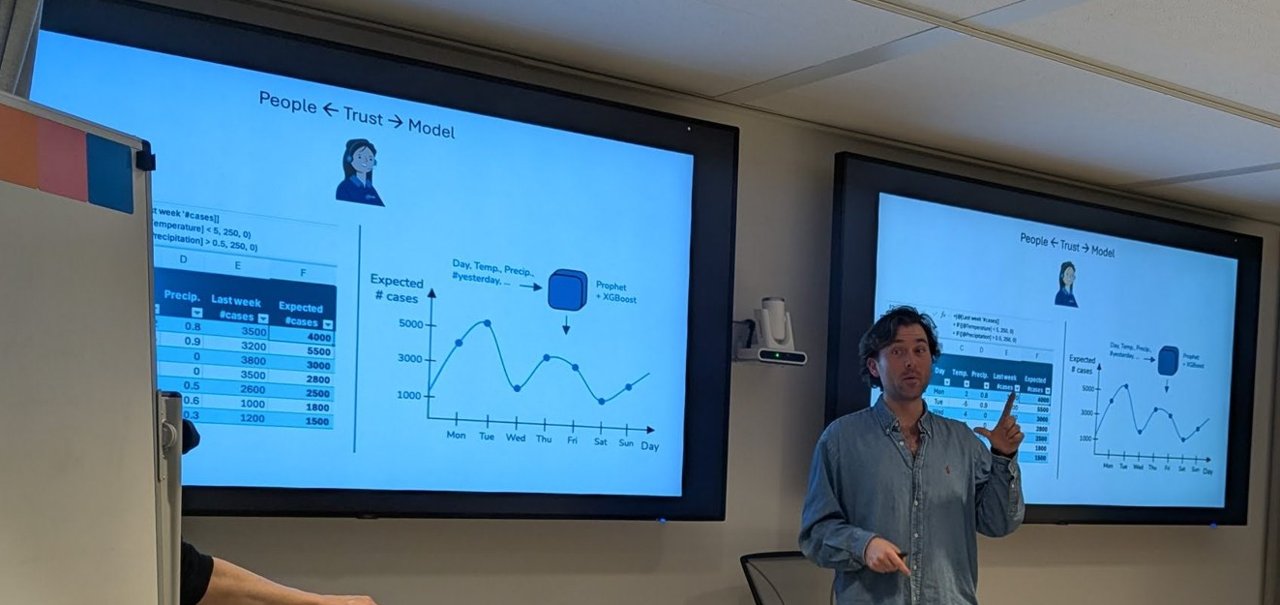
Left: the ANWB operating model, from intake to dispatch. Right: “People ← Trust → Model”, the spreadsheet rule next to the forecast.
The second slide, “People ← Trust → Model”, put two things side by side. On the left was a spreadsheet: last week’s number of cases per day, plus a rule that adds 250 when the temperature drops below 5 and another 250 when precipitation is above 0.5, giving an “Expected #cases” column. On the right, day, temperature, precipitation and yesterday’s count went into a Prophet + XGBoost box that produced an expected-cases curve for the week.
My take: the arrows on that slide point both ways for a reason. A planner who already trusts a simple spreadsheet rule will only accept a model if they can see it doing the same job, using the same inputs, and doing it better. It works the same way when you introduce an automated remediation to an on-call team. Show the old rule and the new model side by side, then let people compare them.
Building production-grade AI agentic workflows with Elastic
The second talk was “Building Production-Grade AI Agentic Workflows with Elastic” by Hans Heerooms, Solutions Architect at Elastic, as shown on his title slide (dated 2026-1-15).
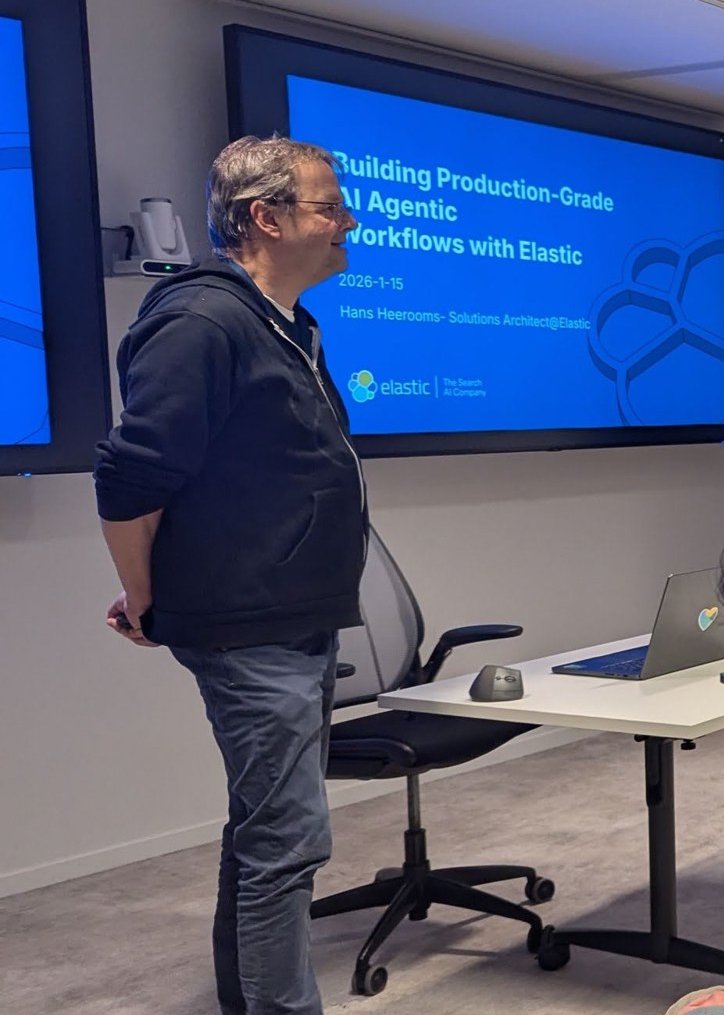
The title slide: “Building Production-Grade AI Agentic Workflows with Elastic”, Hans Heerooms, Solutions Architect @ Elastic.
He opened with a slide titled “Workflow…”: human, application and workflow boxes on both sides of a central workflow (“make it happen”) backed by data. The rest of the talk followed one slide, “Architecture Evolution….”, which described three stages:
- Data driven: data retrieved by queries (search, SQL and so on) steers the workflow directly. For search, that can be lexical, semantic or hybrid queries.
- Retrieval Augmented Generation: the workflow adds query results to a prompt, sends it to a large language model and uses the response.
- Agents and MCP: the workflow no longer touches the data directly. It talks to the LLM via an agent, and the agent decides whether to access data through MCP tools or by calling other agents. The workflow then acts on the response, or the agent and its tools carry out the actions.
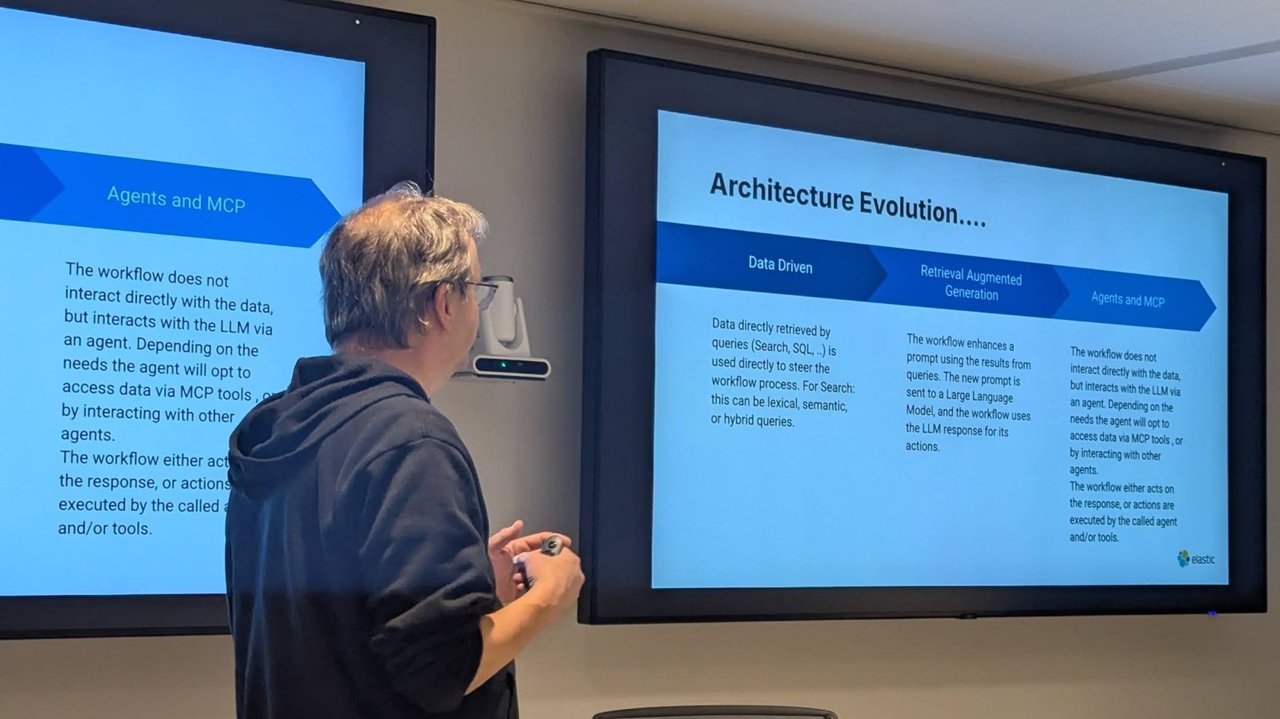
“Architecture Evolution….”: data driven, then RAG, then agents and MCP.
Stage one: modern search
The “Data Driven – Modern Search” slide listed the advantages: mature, scalable at predictable cost, predictable results in both outcome and format. It also listed the challenges: you get the best results with stricter input, you have to choose between lexical, semantic and hybrid search, and you may need a good scoring and ranking strategy. The Elasticsearch column claimed a mature platform, “everything for lexical, semantic and hybrid search”, fast BM25 for lexical search, and a vector database with quantisation and compression. It also listed Jina by Elastic for semantic embedding models, multimodal models and reranking. The QR code on the slide linked to Elastic’s guide to Jina models in Elasticsearch.
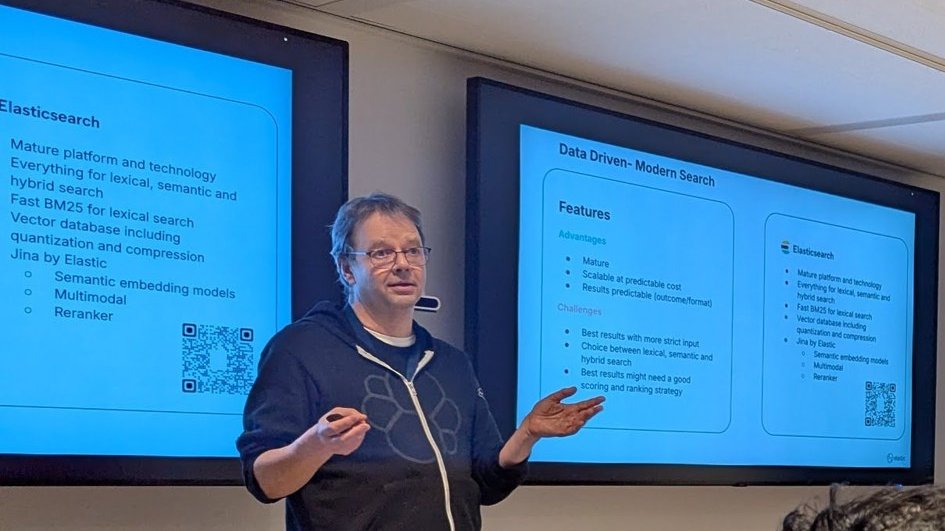
“Data Driven – Modern Search”: advantages, challenges, and what Elasticsearch brings according to Elastic.
The next diagram showed the indexing path. Data and queries both pass through an analyzer, which produces tokens (lexical), and an embedding step, which produces vectors (semantic). Both are stored on the same Elasticsearch document. The caption read: “Query returns documents, or calculation result based on documents.”
Stage two: RAG, and its limits
The RAG slide reused the same diagram. Part of the prompt goes through retrieval, the results build an enhanced prompt, and the LLM produces the output. The caption made the trade-off explicit: “Output is generated by LLM, only controlled by the enhanced prompt.”
The pros-and-cons slide was honest about it. On the plus side: fast prototyping, you can reuse existing search applications, and you get conversation-style output. On the minus side: the prompt is the only output control, you need good prompts for good results, output is not 100% predictable, compatibility across LLMs and upgrades is not guaranteed, and you keep tweaking prompts. According to the Elasticsearch column, Elastic provides proven building blocks for RAG, role-based authorisation for private data, and auditing and monitoring of the conversations.
Stage three: agents and MCP
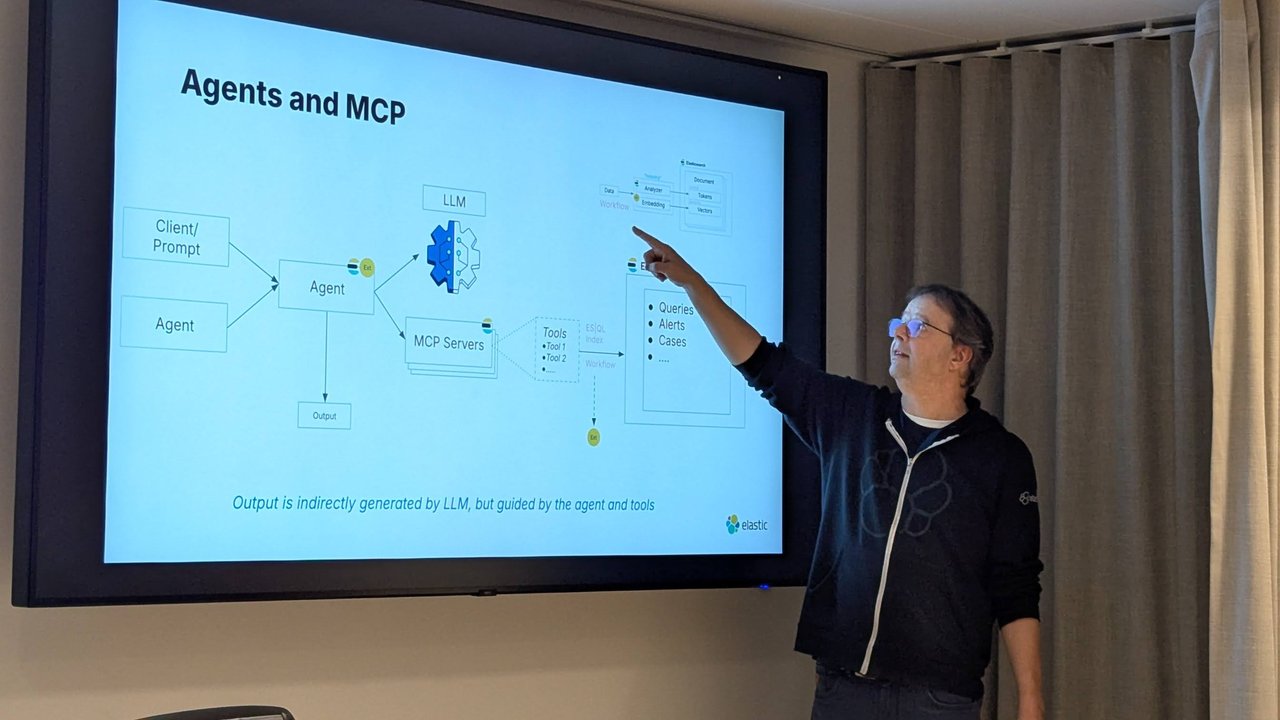
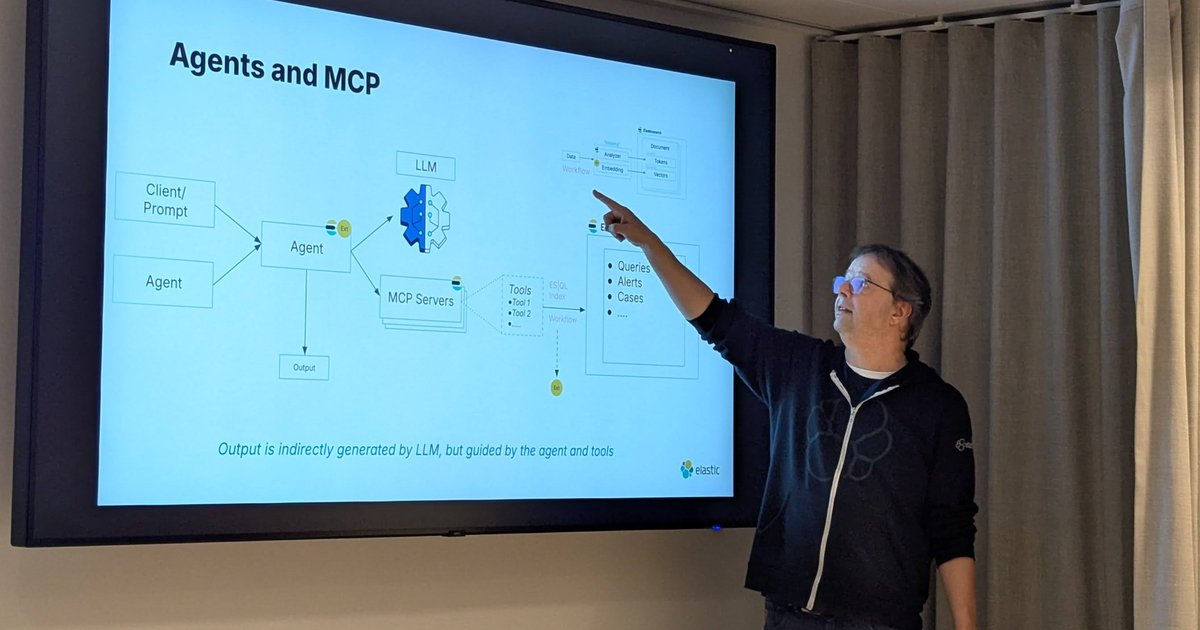
“Agents and MCP”: output is indirectly generated by the LLM, but guided by the agent and tools.
In the third diagram, a client prompt or another agent calls an agent. The agent talks to the LLM and to MCP servers, whose tools reach Elasticsearch via ES|QL, an index or a workflow, and work with queries, alerts and cases. The caption: “Output is indirectly generated by LLM, but guided by the agent and tools.” In his words, you still get output from the LLM, but “you have a little bit more control” over it.
The features slide listed better conversation control, an open architecture, combining multiple models, and going beyond conversations. The challenges were that it is all new, “very much green field”, plus observability and security. Elastic’s column read: platform capability, open by design, build agents and MCP tools, and, in italics, “Preview: Workflows in Elastic as tool”.
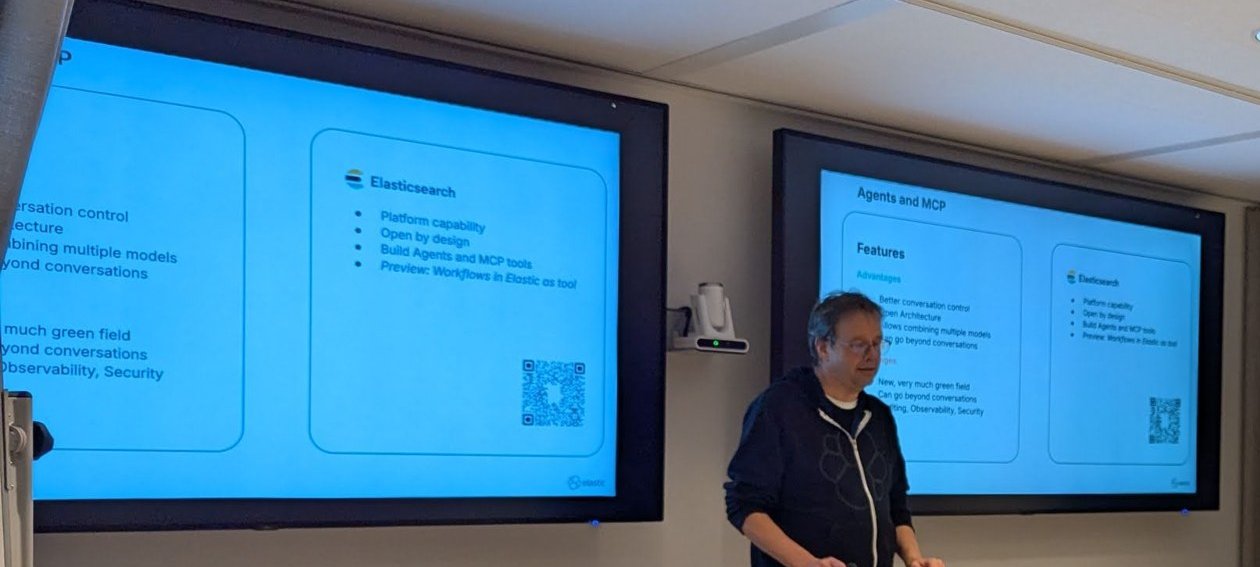
The Agents and MCP features slide, with workflows-as-tools still marked “Preview”.
The demo: from UFO reports to a web shop agent
The demo opened with “Elastic Agentic Workflow: MIB Protocol”, a Men in Black joke. On the slide, “you, the witness” chat with an agent built in Elastic Agent Builder. The agent calls a report tool, scores the sighting and runs a report workflow, which ends at a “Neuralyzer Tool”. Hans said a colleague had built it in one day. The app combined ES|QL with geo selection and mapping. He reported a UFO above the office on the Keizersgracht, and the agent called its tools and drafted the sighting report. Then he moved on, because “UFOs are cool but not really a business”.
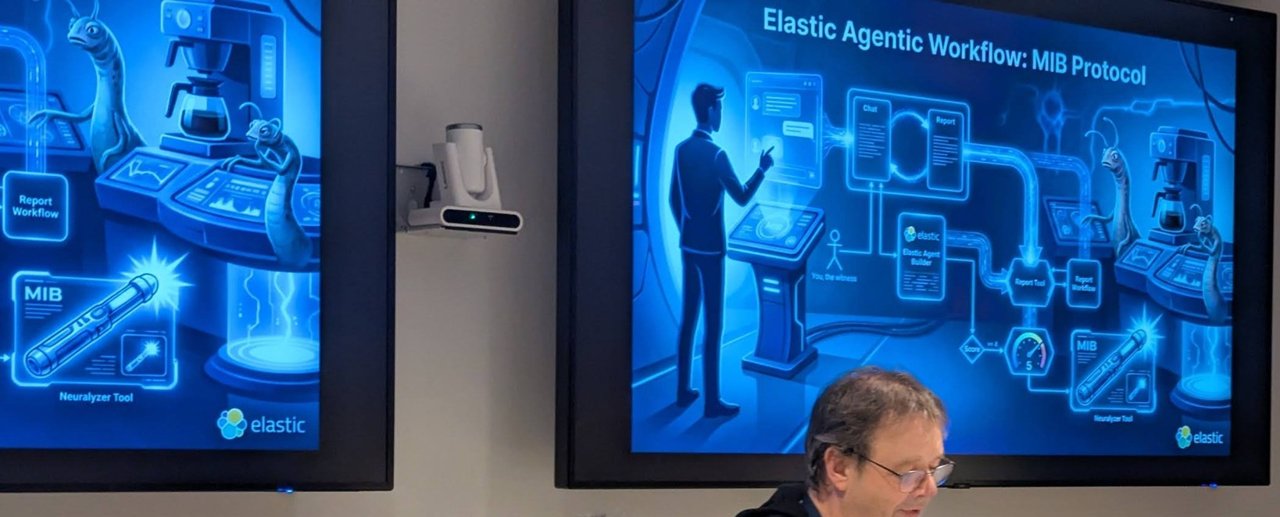
“Elastic Agentic Workflow: MIB Protocol”: the playful opener before the real demo.
The main demo was a shop assistant for an e-commerce site backed by three indices: customers, products and orders. In Agent Builder he walked through:
- Custom instructions: a friendly assistant for a logged-in customer that needs the customer ID, and that should always bring up promotions (“You want to sell stuff”).
- Seven active tools: built-in tools to search data, generate and execute ES|QL and read index mappings, plus three custom ones: get customer information, get latest order status, and get promoted products.
- A custom ES|QL tool: the customer-information tool was a parameterised ES|QL query on the customers index, filtered on the customer ID and returning a fixed set of demo fields.
With a customer ID in the chat, the agent showed its reasoning steps and tool calls, greeted the (fictional) loyalty member and listed the current promotions.
The same agent over A2A
The shop agent was not only reachable from the Kibana chat. Later in the same demo, his screen showed a small Python project in VS Code with an a2a_client.py module. Its main.py imported an A2A client, tested connectivity to the remote agent, then ran two examples against it: a customer conversation and a “products by category” question. The terminal printed product counts per catalogue category. The audio for this part of my recording is unusable, so I can only describe what was on screen. Elastic documents an Agent Builder A2A server with per-agent endpoints and API-key authentication, which fits what the client was doing.
Workflows (technical preview)
Next came Workflows. On 15 January Hans said it would be a technical preview “in two weeks”. It shipped as a technical preview in Elastic 9.3 on 3 February 2026 (see below). He said the next meetup would go deeper. A workflow is a YAML file with a name, an enabled flag, a description, tags and triggers. A trigger can be manual (an API call or the run button) or an alert, either from your own rule or from the Observability or Security solutions. Workflows take inputs and variables, then run steps. In his words, steps could reach Elasticsearch and Kibana features (cases, alerts), send email, post to Slack, call Gemini or GitHub, talk to MCP and call other agents. He was clear that “this is not production”: the final step list might grow or shrink. He also expected a UI on top of the YAML a few releases later.
He anticipated the question of why YAML rather than JSON. His answer: YAML is easy to read for people and for LLMs. He said Elastic has spent about two years designing assets, from its documentation backend to its query language, to be easy for large language models to read and generate.
His running example used ES|QL to generate three random customer names, then a second step that formatted them on one line, with a manual trigger. He then registered that workflow as a tool, so the shop agent could call it.
MCP from VS Code
To finish, he opened Visual Studio Code, where his MCP configuration declared the Elastic deployment as an “e-commerce” MCP server, authenticated with an API key. He listed the tools on that server and called the random-customers tool. The tool ran the ES|QL query and the formatting on the Elastic side, and the LLM on the client side wrote the answer. His closing line was that these workflows are going to be a big thing in Elastic.
What I checked afterwards
I compared the talk against Elastic’s documentation and blog, since much of it was shown before release:
- Agent Builder is generally available in Elastic Cloud Serverless and in the Elastic Stack from 9.3, according to Elastic’s GA announcement.
- The Agent Builder MCP server is served at
{KIBANA_URL}/api/agent_builder/mcp, according to Elastic’s MCP server docs. It is GA from 9.3 (preview in 9.2) and supports API-key authentication, with OAuth 2.1 on Serverless only. - Elastic Workflows shipped as a technical preview in Elastic 9.3, defined in YAML with triggers (alert, scheduled, manual), inputs and steps, according to Elastic’s Workflows post from 3 February 2026. The same post says workflows can be exposed to Agent Builder as tools, and agents can run as workflow steps. That matches what was demoed in January. Workflows then became generally available in Elastic 9.4, according to Elastic’s 9.4 release post of 5 May 2026.
- The 9.3 timing is confirmed by Elastic’s 9.3 release post, dated 3 February 2026, which lists Workflows as a technical preview and Agent Builder as generally available. That was about three weeks after the meetup, close to the “two weeks” Hans gave.
My take, from the platform side
- Tools are your new API surface. The custom tools in the demo were a fixed, parameterised ES|QL query. That is the pattern I would push for in production. Give the agent narrow, reviewed queries for the common paths and keep “generate any query” tools for exploration. The same advice is in my enterprise RAG architecture patterns post: retrieval you can’t explain is retrieval you can’t debug.
- “Observability, security” was on the challenges list, and rightly so. Every agent turn becomes a chain of LLM calls and tool calls. You want those traced like any other distributed request, with the tool name, parameters and latency on the span. Treat MCP API keys like service-account credentials: scope them to the indices the tools need and rotate them. Elastic’s docs note that API-key credentials are long-lived with snapshotted permissions, which is another reason to keep them narrow.
- YAML workflows belong in Git. If a workflow can be fired by a Security alert and post to Slack or call another agent, it is production automation. Review it, version it and promote it between environments like any other pipeline definition. That applied while it was a preview and applies even more now that it is GA.
- Hybrid search still needs tuning. The “Modern Search” slide listed “a good scoring and ranking strategy” as a challenge. In Elasticsearch, reciprocal rank fusion is the usual starting point for combining BM25 and vector results. Put the agent on top only after that layer is solid. I covered the same “search first, then reason” idea for graphs in Neo4j vector index for GraphRAG.
A month later I was back in the same building for SRE NL’s observability evening, which I wrote up in SRE NL at Elastic: OpenTelemetry and Your Brain’s Biases.
Related
- Enterprise RAG Architecture Patterns at Scale
- SRE NL at Elastic: OpenTelemetry and Your Brain’s Biases
- Neo4j Vector Index for GraphRAG: Search, Then Traverse
- AGNTCon + MCPCon Europe 2026 Recap: Agents, MCP, and Production Reality
- Prophet vs XGBoost: Demand Forecasting With Weather
- Elastic Agent Builder MCP: Tools and Workflows, No LLM